Changelog
Review our latest product updates
Changelog
Review our latest product updates
Changelog
Review our latest product updates
Your saved Views are now available directly from the table toolbar. Open Views to search your saved setups, switch between them, or create a new view from your current filters, columns, and sorting.
Choose Default to return to the table’s original layout while keeping your selected stations. The active view is marked in the menu, and pressing V opens the switcher directly on Mac, Windows, and Linux.
Further Improvements
Bookmarks now shows your saved-item count in the sidebar. You can hide it under Settings → Preferences → Count badges.
Reports and Payments now support SLAs that start or end mid-month, with the exact date range shown in tables, detail pages, emails, and exports.
Reports and statements use consistent Claimed and Calculated labels, with clearer compensation breakdowns.
Compensation history charts display penalty caps more clearly.
Failed turnaround feedback checks now show the responsible Service Partner beside the decision controls when one can be identified.
Your saved Views are now available directly from the table toolbar. Open Views to search your saved setups, switch between them, or create a new view from your current filters, columns, and sorting.
Choose Default to return to the table’s original layout while keeping your selected stations. The active view is marked in the menu, and pressing V opens the switcher directly on Mac, Windows, and Linux.
Further Improvements
Bookmarks now shows your saved-item count in the sidebar. You can hide it under Settings → Preferences → Count badges.
Reports and Payments now support SLAs that start or end mid-month, with the exact date range shown in tables, detail pages, emails, and exports.
Reports and statements use consistent Claimed and Calculated labels, with clearer compensation breakdowns.
Compensation history charts display penalty caps more clearly.
Failed turnaround feedback checks now show the responsible Service Partner beside the decision controls when one can be identified.
Your saved Views are now available directly from the table toolbar. Open Views to search your saved setups, switch between them, or create a new view from your current filters, columns, and sorting.
Choose Default to return to the table’s original layout while keeping your selected stations. The active view is marked in the menu, and pressing V opens the switcher directly on Mac, Windows, and Linux.
Further Improvements
Bookmarks now shows your saved-item count in the sidebar. You can hide it under Settings → Preferences → Count badges.
Reports and Payments now support SLAs that start or end mid-month, with the exact date range shown in tables, detail pages, emails, and exports.
Reports and statements use consistent Claimed and Calculated labels, with clearer compensation breakdowns.
Compensation history charts display penalty caps more clearly.
Failed turnaround feedback checks now show the responsible Service Partner beside the decision controls when one can be identified.

Keep the records you want to revisit in one place. Cosmos now lets you bookmark Flights, Baggage, Quality Checks, Reports, and Payments from their action menus, then return to them from the new Bookmarks section in the sidebar.
Bookmarks are personal to you. Filter the list by record type, adjust its display and sorting, or save a filtered setup as a View and pin it to your sidebar. Open Bookmarks from the command menu or press G then M.
Further Improvements
Filters now offer presets such as Last month, Last 7, 30, or 90 days, and Year to date. Saved views retain the preset so the range stays current.
A searchable shortcut overview is available from the user menu, command menu, or by pressing
#outside a text input.Station selections now appear in the filter bar and stay in sync with the station switcher.
Saving and editing views now opens in a bottom drawer on mobile.
Keep the records you want to revisit in one place. Cosmos now lets you bookmark Flights, Baggage, Quality Checks, Reports, and Payments from their action menus, then return to them from the new Bookmarks section in the sidebar.
Bookmarks are personal to you. Filter the list by record type, adjust its display and sorting, or save a filtered setup as a View and pin it to your sidebar. Open Bookmarks from the command menu or press G then M.
Further Improvements
Filters now offer presets such as Last month, Last 7, 30, or 90 days, and Year to date. Saved views retain the preset so the range stays current.
A searchable shortcut overview is available from the user menu, command menu, or by pressing
#outside a text input.Station selections now appear in the filter bar and stay in sync with the station switcher.
Saving and editing views now opens in a bottom drawer on mobile.
Keep the records you want to revisit in one place. Cosmos now lets you bookmark Flights, Baggage, Quality Checks, Reports, and Payments from their action menus, then return to them from the new Bookmarks section in the sidebar.
Bookmarks are personal to you. Filter the list by record type, adjust its display and sorting, or save a filtered setup as a View and pin it to your sidebar. Open Bookmarks from the command menu or press G then M.
Further Improvements
Filters now offer presets such as Last month, Last 7, 30, or 90 days, and Year to date. Saved views retain the preset so the range stays current.
A searchable shortcut overview is available from the user menu, command menu, or by pressing
#outside a text input.Station selections now appear in the filter bar and stay in sync with the station switcher.
Saving and editing views now opens in a bottom drawer on mobile.

Cosmos now brings updates across Flights, Baggage, Quality Checks, Reports, and Payments together in a single email digest. Updates are grouped into clear sections with relevant details and direct links to the records in Cosmos, making it easier to catch up and take action.
Choose hourly, daily, or weekly delivery in Settings → Notifications, and select which updates to include. Daily is the default, arriving at 06:40 UTC; weekly digests arrive on Mondays at the same time. You can switch the digest and individual notifications on or off at any time, giving you more flexibility in how you receive updates.
Cosmos now brings updates across Flights, Baggage, Quality Checks, Reports, and Payments together in a single email digest. Updates are grouped into clear sections with relevant details and direct links to the records in Cosmos, making it easier to catch up and take action.
Choose hourly, daily, or weekly delivery in Settings → Notifications, and select which updates to include. Daily is the default, arriving at 06:40 UTC; weekly digests arrive on Mondays at the same time. You can switch the digest and individual notifications on or off at any time, giving you more flexibility in how you receive updates.
Cosmos now brings updates across Flights, Baggage, Quality Checks, Reports, and Payments together in a single email digest. Updates are grouped into clear sections with relevant details and direct links to the records in Cosmos, making it easier to catch up and take action.
Choose hourly, daily, or weekly delivery in Settings → Notifications, and select which updates to include. Daily is the default, arriving at 06:40 UTC; weekly digests arrive on Mondays at the same time. You can switch the digest and individual notifications on or off at any time, giving you more flexibility in how you receive updates.

Cosmos now lets you save your table setup as a personal view. To get started simply adjust filters, visible columns, and sorting for tables like Flights, Baggage, Quality Checks, Reports, or Payments, then save the result as a custom view.
Give each view a name, an optional description, and its own icon and color. Pin your most-used views to the sidebar for direct access, or find them all in the new Views section. Open it from the command palette or press G then V.
Views stay with you as you open individual records, with the view name in the breadcrumb making it easy to return to your filtered table. Adjust a setup and save your changes, save it as a new view, or duplicate an existing view to build a variation. Views can also keep a specific station selection or follow the stations you are currently working with.
Further Improvements
Display options now let you choose visible columns and sorting across features.
Default columns adapt to the available space, with additional columns available from the Display menu. This makes Cosmos much more enjoyable on mobile devices.
Reports and Payments now support stepping between records directly from their detail pages, and they follow the table’s filters and sort order.
Payment notifications now include newly imported handling costs, and uploads show a clear processing status.
Activity feeds now load faster and are more responsive. Long comments wrap correctly and loading placeholders align consistently.
Stepping through flights is more responsive, with less flicker in the breadcrumb and navigation controls.
Cosmos now lets you save your table setup as a personal view. To get started simply adjust filters, visible columns, and sorting for tables like Flights, Baggage, Quality Checks, Reports, or Payments, then save the result as a custom view.
Give each view a name, an optional description, and its own icon and color. Pin your most-used views to the sidebar for direct access, or find them all in the new Views section. Open it from the command palette or press G then V.
Views stay with you as you open individual records, with the view name in the breadcrumb making it easy to return to your filtered table. Adjust a setup and save your changes, save it as a new view, or duplicate an existing view to build a variation. Views can also keep a specific station selection or follow the stations you are currently working with.
Further Improvements
Display options now let you choose visible columns and sorting across features.
Default columns adapt to the available space, with additional columns available from the Display menu. This makes Cosmos much more enjoyable on mobile devices.
Reports and Payments now support stepping between records directly from their detail pages, and they follow the table’s filters and sort order.
Payment notifications now include newly imported handling costs, and uploads show a clear processing status.
Activity feeds now load faster and are more responsive. Long comments wrap correctly and loading placeholders align consistently.
Stepping through flights is more responsive, with less flicker in the breadcrumb and navigation controls.
Cosmos now lets you save your table setup as a personal view. To get started simply adjust filters, visible columns, and sorting for tables like Flights, Baggage, Quality Checks, Reports, or Payments, then save the result as a custom view.
Give each view a name, an optional description, and its own icon and color. Pin your most-used views to the sidebar for direct access, or find them all in the new Views section. Open it from the command palette or press G then V.
Views stay with you as you open individual records, with the view name in the breadcrumb making it easy to return to your filtered table. Adjust a setup and save your changes, save it as a new view, or duplicate an existing view to build a variation. Views can also keep a specific station selection or follow the stations you are currently working with.
Further Improvements
Display options now let you choose visible columns and sorting across features.
Default columns adapt to the available space, with additional columns available from the Display menu. This makes Cosmos much more enjoyable on mobile devices.
Reports and Payments now support stepping between records directly from their detail pages, and they follow the table’s filters and sort order.
Payment notifications now include newly imported handling costs, and uploads show a clear processing status.
Activity feeds now load faster and are more responsive. Long comments wrap correctly and loading placeholders align consistently.
Stepping through flights is more responsive, with less flicker in the breadcrumb and navigation controls.

Cosmos now includes a command menu for faster navigation and everyday actions across the app. Press Cmd + K on Mac or Ctrl + K on Windows and Linux to open it from anywhere, then search for sections, commands, account actions, and help resources without going through the sidebar.
The menu makes keyboard workflows easier to discover and use. Navigation shortcuts like G then F to navigate to Flights are shown directly next to their actions, while commands such as switching theme, toggling the sidebar, creating a quality check, opening support, or signing out are available from the same place.
This gives frequent users a faster way to move through Cosmos, while keeping the existing sidebar and page-level workflows unchanged.
Further Improvements
Theme switching now has dedicated keyboard shortcuts.
Shortcut labels now use consistent keyboard key styling across the app.
Settings remembers where users came from, so
Back to appreturns to the previous page.Loading states now transition more smoothly into loaded content.
Infinite lists now show a clear end-of-list hint after all results have loaded.
Dialog cancel buttons now use a more consistent, quieter style.
The filter picker can now be opened directly with the keyboard shortcut
F.Dashboard delay codes now link directly to filtered Flights when users have access.
Cosmos now includes a command menu for faster navigation and everyday actions across the app. Press Cmd + K on Mac or Ctrl + K on Windows and Linux to open it from anywhere, then search for sections, commands, account actions, and help resources without going through the sidebar.
The menu makes keyboard workflows easier to discover and use. Navigation shortcuts like G then F to navigate to Flights are shown directly next to their actions, while commands such as switching theme, toggling the sidebar, creating a quality check, opening support, or signing out are available from the same place.
This gives frequent users a faster way to move through Cosmos, while keeping the existing sidebar and page-level workflows unchanged.
Further Improvements
Theme switching now has dedicated keyboard shortcuts.
Shortcut labels now use consistent keyboard key styling across the app.
Settings remembers where users came from, so
Back to appreturns to the previous page.Loading states now transition more smoothly into loaded content.
Infinite lists now show a clear end-of-list hint after all results have loaded.
Dialog cancel buttons now use a more consistent, quieter style.
The filter picker can now be opened directly with the keyboard shortcut
F.Dashboard delay codes now link directly to filtered Flights when users have access.
Cosmos now includes a command menu for faster navigation and everyday actions across the app. Press Cmd + K on Mac or Ctrl + K on Windows and Linux to open it from anywhere, then search for sections, commands, account actions, and help resources without going through the sidebar.
The menu makes keyboard workflows easier to discover and use. Navigation shortcuts like G then F to navigate to Flights are shown directly next to their actions, while commands such as switching theme, toggling the sidebar, creating a quality check, opening support, or signing out are available from the same place.
This gives frequent users a faster way to move through Cosmos, while keeping the existing sidebar and page-level workflows unchanged.
Further Improvements
Theme switching now has dedicated keyboard shortcuts.
Shortcut labels now use consistent keyboard key styling across the app.
Settings remembers where users came from, so
Back to appreturns to the previous page.Loading states now transition more smoothly into loaded content.
Infinite lists now show a clear end-of-list hint after all results have loaded.
Dialog cancel buttons now use a more consistent, quieter style.
The filter picker can now be opened directly with the keyboard shortcut
F.Dashboard delay codes now link directly to filtered Flights when users have access.

Cosmos now has right-click context menus on table rows and unified … action menus on detail pages across Flights, Baggage, Quality Checks, Reports, and Payments.
From a row or detail view, users can quickly open records in a new tab, copy URLs, IDs, links, or pasteable summaries, and narrow tables with relevant filters without rebuilding the search manually. The actions are tailored to each workflow: create a Quality Check again from an existing one, request a baggage change, open linked flights, download reports, print statements, or jump between related reports and payments.
The new menus also received a visual polish, with clearer floating shadows, lighter icon styling, improved alignment, and reduced-motion support for users who prefer less animation.
Further Improvements
Flight delay values now show the underlying delay codes on hover, including code, description, and minutes.
Operational times, dates, numbers, and currency amounts are now formatted more consistently across Cosmos.
Header labels, icons, sheet controls, and flight-detail navigation have cleaner sizing and alignment.
Toast notification icons now align better with titles and stay out of the way when a toast includes an action.
Related Quality Checks in flight details use softer styling so IDs and status information remain easier to scan.
Company logo tags now render more cleanly in compact icon-only contexts, with improved accessible labeling.
Cosmos now has right-click context menus on table rows and unified … action menus on detail pages across Flights, Baggage, Quality Checks, Reports, and Payments.
From a row or detail view, users can quickly open records in a new tab, copy URLs, IDs, links, or pasteable summaries, and narrow tables with relevant filters without rebuilding the search manually. The actions are tailored to each workflow: create a Quality Check again from an existing one, request a baggage change, open linked flights, download reports, print statements, or jump between related reports and payments.
The new menus also received a visual polish, with clearer floating shadows, lighter icon styling, improved alignment, and reduced-motion support for users who prefer less animation.
Further Improvements
Flight delay values now show the underlying delay codes on hover, including code, description, and minutes.
Operational times, dates, numbers, and currency amounts are now formatted more consistently across Cosmos.
Header labels, icons, sheet controls, and flight-detail navigation have cleaner sizing and alignment.
Toast notification icons now align better with titles and stay out of the way when a toast includes an action.
Related Quality Checks in flight details use softer styling so IDs and status information remain easier to scan.
Company logo tags now render more cleanly in compact icon-only contexts, with improved accessible labeling.
Cosmos now has right-click context menus on table rows and unified … action menus on detail pages across Flights, Baggage, Quality Checks, Reports, and Payments.
From a row or detail view, users can quickly open records in a new tab, copy URLs, IDs, links, or pasteable summaries, and narrow tables with relevant filters without rebuilding the search manually. The actions are tailored to each workflow: create a Quality Check again from an existing one, request a baggage change, open linked flights, download reports, print statements, or jump between related reports and payments.
The new menus also received a visual polish, with clearer floating shadows, lighter icon styling, improved alignment, and reduced-motion support for users who prefer less animation.
Further Improvements
Flight delay values now show the underlying delay codes on hover, including code, description, and minutes.
Operational times, dates, numbers, and currency amounts are now formatted more consistently across Cosmos.
Header labels, icons, sheet controls, and flight-detail navigation have cleaner sizing and alignment.
Toast notification icons now align better with titles and stay out of the way when a toast includes an action.
Related Quality Checks in flight details use softer styling so IDs and status information remain easier to scan.
Company logo tags now render more cleanly in compact icon-only contexts, with improved accessible labeling.
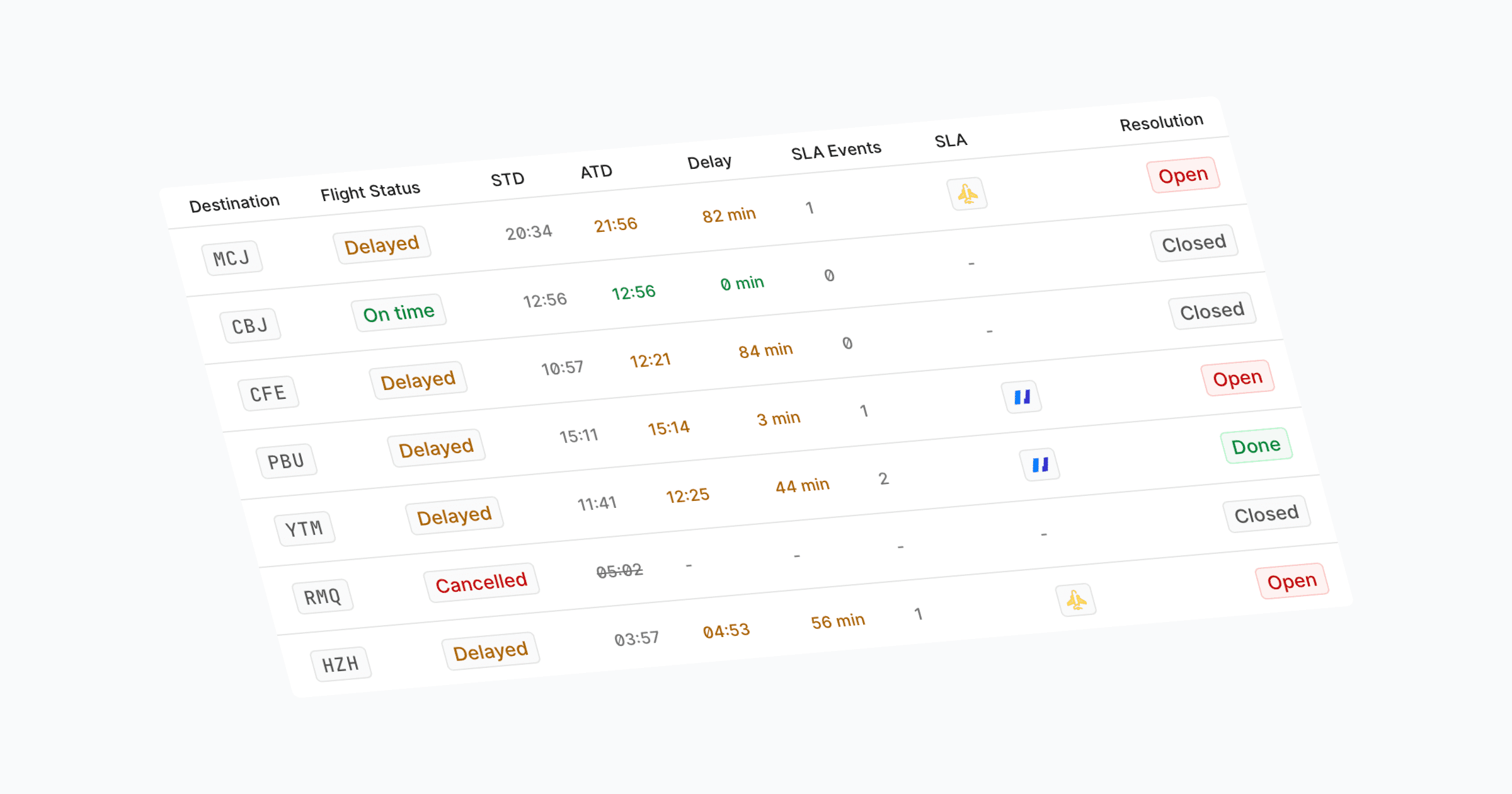
We’ve updated Flights to make operational review faster and easier to scan. The table now gives scheduled departure, actual departure, delay, flight status, departure, and destination their own columns. Times show the relevant clock reading directly, with additional UTC and airport-local context available on hover.
Flights can now be filtered more precisely by actual departure time and delay minutes. Departure-time filters support both date-only and time-specific bounds, making it easier to investigate a specific operating window or identify early or late departures.
Navigation across Cosmos is smoother as well. Breadcrumbs now show the current location in the app header and preserve table filters when returning from detail views. Flight details also include up/down navigation so users can step through the filtered flight list without going back to the table each time.
Further Improvements
Pending Memberships is now fully available in User Management, giving admins a dedicated Pending tab for completing user setup.
Filter pickers now adapt better on mobile, opening in a bottom drawer when there is not enough side space and preventing applied filter chips from causing horizontal scroll.
Mobile navigation closes automatically after selecting a page or section.
We’ve updated Flights to make operational review faster and easier to scan. The table now gives scheduled departure, actual departure, delay, flight status, departure, and destination their own columns. Times show the relevant clock reading directly, with additional UTC and airport-local context available on hover.
Flights can now be filtered more precisely by actual departure time and delay minutes. Departure-time filters support both date-only and time-specific bounds, making it easier to investigate a specific operating window or identify early or late departures.
Navigation across Cosmos is smoother as well. Breadcrumbs now show the current location in the app header and preserve table filters when returning from detail views. Flight details also include up/down navigation so users can step through the filtered flight list without going back to the table each time.
Further Improvements
Pending Memberships is now fully available in User Management, giving admins a dedicated Pending tab for completing user setup.
Filter pickers now adapt better on mobile, opening in a bottom drawer when there is not enough side space and preventing applied filter chips from causing horizontal scroll.
Mobile navigation closes automatically after selecting a page or section.
We’ve updated Flights to make operational review faster and easier to scan. The table now gives scheduled departure, actual departure, delay, flight status, departure, and destination their own columns. Times show the relevant clock reading directly, with additional UTC and airport-local context available on hover.
Flights can now be filtered more precisely by actual departure time and delay minutes. Departure-time filters support both date-only and time-specific bounds, making it easier to investigate a specific operating window or identify early or late departures.
Navigation across Cosmos is smoother as well. Breadcrumbs now show the current location in the app header and preserve table filters when returning from detail views. Flight details also include up/down navigation so users can step through the filtered flight list without going back to the table each time.
Further Improvements
Pending Memberships is now fully available in User Management, giving admins a dedicated Pending tab for completing user setup.
Filter pickers now adapt better on mobile, opening in a bottom drawer when there is not enough side space and preventing applied filter chips from causing horizontal scroll.
Mobile navigation closes automatically after selecting a page or section.
Cosmos now supports dark mode, giving users a cleaner, lower-glare interface for working comfortably across different environments.
The new dark theme includes tuned contrast across controls, panels, filters, and company logos so key actions and branded elements stay crisp on dark surfaces. Menus, selectors, and long picker lists also have smoother scroll fades, making dense workflows feel more polished and easier to navigate.
We also made Cosmos fully keyboard accessible. Table rows, filter menus, file uploads, sidebar navigation, and icon-only controls now work smoothly with keyboard navigation and screen readers. Common forms also support Cmd/Ctrl + Enter more consistently where quick submission is expected.
Further Improvements
Large infinite-scroll tables now stay responsive and load faster when many stations are selected.
Quality Check notification emails now show service times in the airport’s local timezone.
Quality Checks can now be canceled instead of only deleted. Canceled Quality Checks remain visible in Cosmos, are clearly marked as canceled, and can no longer be edited, making it easier to preserve the history of a check.
Empty states and user-facing copy are clearer and more natural across tables and workflows.
Cosmos now supports dark mode, giving users a cleaner, lower-glare interface for working comfortably across different environments.
The new dark theme includes tuned contrast across controls, panels, filters, and company logos so key actions and branded elements stay crisp on dark surfaces. Menus, selectors, and long picker lists also have smoother scroll fades, making dense workflows feel more polished and easier to navigate.
We also made Cosmos fully keyboard accessible. Table rows, filter menus, file uploads, sidebar navigation, and icon-only controls now work smoothly with keyboard navigation and screen readers. Common forms also support Cmd/Ctrl + Enter more consistently where quick submission is expected.
Further Improvements
Large infinite-scroll tables now stay responsive and load faster when many stations are selected.
Quality Check notification emails now show service times in the airport’s local timezone.
Quality Checks can now be canceled instead of only deleted. Canceled Quality Checks remain visible in Cosmos, are clearly marked as canceled, and can no longer be edited, making it easier to preserve the history of a check.
Empty states and user-facing copy are clearer and more natural across tables and workflows.
Cosmos now supports dark mode, giving users a cleaner, lower-glare interface for working comfortably across different environments.
The new dark theme includes tuned contrast across controls, panels, filters, and company logos so key actions and branded elements stay crisp on dark surfaces. Menus, selectors, and long picker lists also have smoother scroll fades, making dense workflows feel more polished and easier to navigate.
We also made Cosmos fully keyboard accessible. Table rows, filter menus, file uploads, sidebar navigation, and icon-only controls now work smoothly with keyboard navigation and screen readers. Common forms also support Cmd/Ctrl + Enter more consistently where quick submission is expected.
Further Improvements
Large infinite-scroll tables now stay responsive and load faster when many stations are selected.
Quality Check notification emails now show service times in the airport’s local timezone.
Quality Checks can now be canceled instead of only deleted. Canceled Quality Checks remain visible in Cosmos, are clearly marked as canceled, and can no longer be edited, making it easier to preserve the history of a check.
Empty states and user-facing copy are clearer and more natural across tables and workflows.
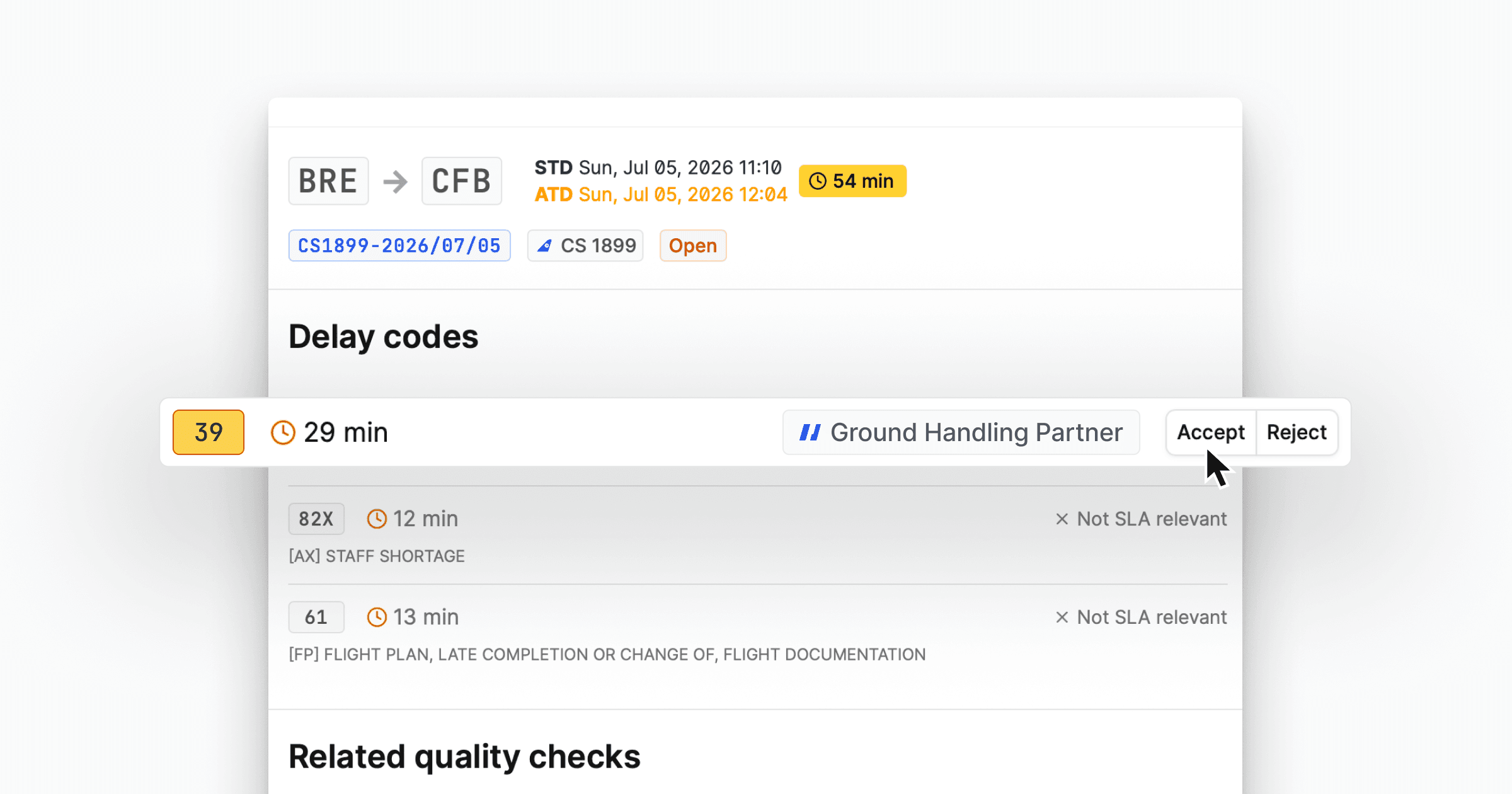
Service Partners can now accept or reject SLA-relevant items directly in Cosmos across Flights, Quality Checks, and Baggage.
Organization admins can configure these actions per feature, deciding whether Service Partners can use Accept, Reject, or both for each workflow. For flight delays, quality checks, and mishandled bags, Service Partners can confirm an item with Accept or raise an objection with Reject when those actions are enabled. Accepting can include an optional comment, while rejecting requires a reason so the airline team has the context needed for review.
Accept and reject events are also shown in the activity feed, including the relevant delay code, RL code, service basic, and delay minutes where applicable. This makes collaboration between airlines and service partners easier to audit and follow up.
Further Improvements
Feature: In addition to deletion, Quality Checks can now be canceled so they are excluded from SLA reports while staying visible for audit history.
Feature: SLA Statements now include a historical compensation chart ranging up to the past 12 months.
Feature: Baggage bulk workflows now support selecting multiple bags and show a selected count.
Feature: User hover cards and role tags make user context clearer across activity feeds and user management. Hovering over user names can show a compact user card with details like name, email, and role, and the user menu now surfaces clearer profile and role information.
Improvement: Single-airline workspaces now hide redundant airline fields in more places.
Improvement: Sidebar and sheet layouts behave better on medium-sized screens.
Service Partners can now accept or reject SLA-relevant items directly in Cosmos across Flights, Quality Checks, and Baggage.
Organization admins can configure these actions per feature, deciding whether Service Partners can use Accept, Reject, or both for each workflow. For flight delays, quality checks, and mishandled bags, Service Partners can confirm an item with Accept or raise an objection with Reject when those actions are enabled. Accepting can include an optional comment, while rejecting requires a reason so the airline team has the context needed for review.
Accept and reject events are also shown in the activity feed, including the relevant delay code, RL code, service basic, and delay minutes where applicable. This makes collaboration between airlines and service partners easier to audit and follow up.
Further Improvements
Feature: In addition to deletion, Quality Checks can now be canceled so they are excluded from SLA reports while staying visible for audit history.
Feature: SLA Statements now include a historical compensation chart ranging up to the past 12 months.
Feature: Baggage bulk workflows now support selecting multiple bags and show a selected count.
Feature: User hover cards and role tags make user context clearer across activity feeds and user management. Hovering over user names can show a compact user card with details like name, email, and role, and the user menu now surfaces clearer profile and role information.
Improvement: Single-airline workspaces now hide redundant airline fields in more places.
Improvement: Sidebar and sheet layouts behave better on medium-sized screens.
Service Partners can now accept or reject SLA-relevant items directly in Cosmos across Flights, Quality Checks, and Baggage.
Organization admins can configure these actions per feature, deciding whether Service Partners can use Accept, Reject, or both for each workflow. For flight delays, quality checks, and mishandled bags, Service Partners can confirm an item with Accept or raise an objection with Reject when those actions are enabled. Accepting can include an optional comment, while rejecting requires a reason so the airline team has the context needed for review.
Accept and reject events are also shown in the activity feed, including the relevant delay code, RL code, service basic, and delay minutes where applicable. This makes collaboration between airlines and service partners easier to audit and follow up.
Further Improvements
Feature: In addition to deletion, Quality Checks can now be canceled so they are excluded from SLA reports while staying visible for audit history.
Feature: SLA Statements now include a historical compensation chart ranging up to the past 12 months.
Feature: Baggage bulk workflows now support selecting multiple bags and show a selected count.
Feature: User hover cards and role tags make user context clearer across activity feeds and user management. Hovering over user names can show a compact user card with details like name, email, and role, and the user menu now surfaces clearer profile and role information.
Improvement: Single-airline workspaces now hide redundant airline fields in more places.
Improvement: Sidebar and sheet layouts behave better on medium-sized screens.

We’ve rolled out a more consistent filtering experience across Cosmos, making it faster to narrow down large operational and admin datasets.
Flights, Baggage, Quality Checks, SLA Reports, SLA Payments, Access Management, User Management, and RL Codes now use clearer filter controls aligned with each table. You can filter by the fields that matter in each workflow, including SLA events, service partners, airlines, stations, payment status, financial amounts, user roles, companies, and code descriptions.
Flights now also support filtering by specific Delay Codes, making it easier to investigate operational patterns and find affected flights directly.
Further Improvements
SLA Reports now also support a download action for PDF-ready report documents.
Station pickers can now be searched by city name, not only airport code or airport name.
Change Request actions and layouts have been polished for clearer selection guidance and better use of screen space.
We’ve rolled out a more consistent filtering experience across Cosmos, making it faster to narrow down large operational and admin datasets.
Flights, Baggage, Quality Checks, SLA Reports, SLA Payments, Access Management, User Management, and RL Codes now use clearer filter controls aligned with each table. You can filter by the fields that matter in each workflow, including SLA events, service partners, airlines, stations, payment status, financial amounts, user roles, companies, and code descriptions.
Flights now also support filtering by specific Delay Codes, making it easier to investigate operational patterns and find affected flights directly.
Further Improvements
SLA Reports now also support a download action for PDF-ready report documents.
Station pickers can now be searched by city name, not only airport code or airport name.
Change Request actions and layouts have been polished for clearer selection guidance and better use of screen space.
We’ve rolled out a more consistent filtering experience across Cosmos, making it faster to narrow down large operational and admin datasets.
Flights, Baggage, Quality Checks, SLA Reports, SLA Payments, Access Management, User Management, and RL Codes now use clearer filter controls aligned with each table. You can filter by the fields that matter in each workflow, including SLA events, service partners, airlines, stations, payment status, financial amounts, user roles, companies, and code descriptions.
Flights now also support filtering by specific Delay Codes, making it easier to investigate operational patterns and find affected flights directly.
Further Improvements
SLA Reports now also support a download action for PDF-ready report documents.
Station pickers can now be searched by city name, not only airport code or airport name.
Change Request actions and layouts have been polished for clearer selection guidance and better use of screen space.
We’ve streamlined the Quality Check create and edit flow so teams can complete checks with fewer manual steps. The form now defaults the time more intelligently, auto-selects the airline when there is only one option, filters service partners based on the selected SLA time, and preloads related flight options where available.
Attachments are now handled from a cleaner icon-only action in the comment footer, and edit mode makes file replacement easier.
Further Improvements
Dashboard activity now loads more efficiently and shows a clearer empty state when there is no recent activity.
Sheets and dialogs received small interaction polish, including a clearer close icon and smoother dialog transitions.
We’ve streamlined the Quality Check create and edit flow so teams can complete checks with fewer manual steps. The form now defaults the time more intelligently, auto-selects the airline when there is only one option, filters service partners based on the selected SLA time, and preloads related flight options where available.
Attachments are now handled from a cleaner icon-only action in the comment footer, and edit mode makes file replacement easier.
Further Improvements
Dashboard activity now loads more efficiently and shows a clearer empty state when there is no recent activity.
Sheets and dialogs received small interaction polish, including a clearer close icon and smoother dialog transitions.
We’ve streamlined the Quality Check create and edit flow so teams can complete checks with fewer manual steps. The form now defaults the time more intelligently, auto-selects the airline when there is only one option, filters service partners based on the selected SLA time, and preloads related flight options where available.
Attachments are now handled from a cleaner icon-only action in the comment footer, and edit mode makes file replacement easier.
Further Improvements
Dashboard activity now loads more efficiently and shows a clearer empty state when there is no recent activity.
Sheets and dialogs received small interaction polish, including a clearer close icon and smoother dialog transitions.

We’ve added a dedicated User Management experience for Admins to Cosmos, making it easier for admins to manage user access across airlines and stations, even when you use Directory Sync.
Admins can now view users in one place, open user details, edit station and airline access, and copy access settings from one user to another. Before saving changes, Cosmos shows a confirmation preview so admins can review exactly what will be updated.
User Management also supports search, clearer user detail dialogs, improved table usability on smaller screens, and CSV export for reporting or offline review.
This reduces manual support work and gives admins more control over day-to-day access management directly inside Cosmos.
Further Improvements
Feature: Quality Checks now support CSV export and improved resolution filtering.
Usability: Expired sessions now show a clear sign-in prompt over the current page, preserving unsaved work and returning users to the same page after re-authentication.
Usability: Comment boxes now support Cmd/Ctrl + Enter, with tooltips on submit buttons.
Usability: Anonymous users are now visually distinct from organization-generated activity in the activity feed.
We’ve added a dedicated User Management experience for Admins to Cosmos, making it easier for admins to manage user access across airlines and stations, even when you use Directory Sync.
Admins can now view users in one place, open user details, edit station and airline access, and copy access settings from one user to another. Before saving changes, Cosmos shows a confirmation preview so admins can review exactly what will be updated.
User Management also supports search, clearer user detail dialogs, improved table usability on smaller screens, and CSV export for reporting or offline review.
This reduces manual support work and gives admins more control over day-to-day access management directly inside Cosmos.
Further Improvements
Feature: Quality Checks now support CSV export and improved resolution filtering.
Usability: Expired sessions now show a clear sign-in prompt over the current page, preserving unsaved work and returning users to the same page after re-authentication.
Usability: Comment boxes now support Cmd/Ctrl + Enter, with tooltips on submit buttons.
Usability: Anonymous users are now visually distinct from organization-generated activity in the activity feed.
We’ve added a dedicated User Management experience for Admins to Cosmos, making it easier for admins to manage user access across airlines and stations, even when you use Directory Sync.
Admins can now view users in one place, open user details, edit station and airline access, and copy access settings from one user to another. Before saving changes, Cosmos shows a confirmation preview so admins can review exactly what will be updated.
User Management also supports search, clearer user detail dialogs, improved table usability on smaller screens, and CSV export for reporting or offline review.
This reduces manual support work and gives admins more control over day-to-day access management directly inside Cosmos.
Further Improvements
Feature: Quality Checks now support CSV export and improved resolution filtering.
Usability: Expired sessions now show a clear sign-in prompt over the current page, preserving unsaved work and returning users to the same page after re-authentication.
Usability: Comment boxes now support Cmd/Ctrl + Enter, with tooltips on submit buttons.
Usability: Anonymous users are now visually distinct from organization-generated activity in the activity feed.

We’ve added downloadable SLA Statements to Cosmos, giving teams a clearer way to review and share payment outcomes.
From the SLA Payment detail view, you can now open a statement that brings together the key information needed for monthly performance discussions: KPI results, threshold details, applied codes, financial breakdowns, and payment context. The statement is designed for printing or saving as PDF, making it easier to share a clean summary with internal teams or partners.
This reduces the need to jump between payment and report views when preparing reviews, approvals, or follow-up discussions.
We’ve added downloadable SLA Statements to Cosmos, giving teams a clearer way to review and share payment outcomes.
From the SLA Payment detail view, you can now open a statement that brings together the key information needed for monthly performance discussions: KPI results, threshold details, applied codes, financial breakdowns, and payment context. The statement is designed for printing or saving as PDF, making it easier to share a clean summary with internal teams or partners.
This reduces the need to jump between payment and report views when preparing reviews, approvals, or follow-up discussions.
We’ve added downloadable SLA Statements to Cosmos, giving teams a clearer way to review and share payment outcomes.
From the SLA Payment detail view, you can now open a statement that brings together the key information needed for monthly performance discussions: KPI results, threshold details, applied codes, financial breakdowns, and payment context. The statement is designed for printing or saving as PDF, making it easier to share a clean summary with internal teams or partners.
This reduces the need to jump between payment and report views when preparing reviews, approvals, or follow-up discussions.
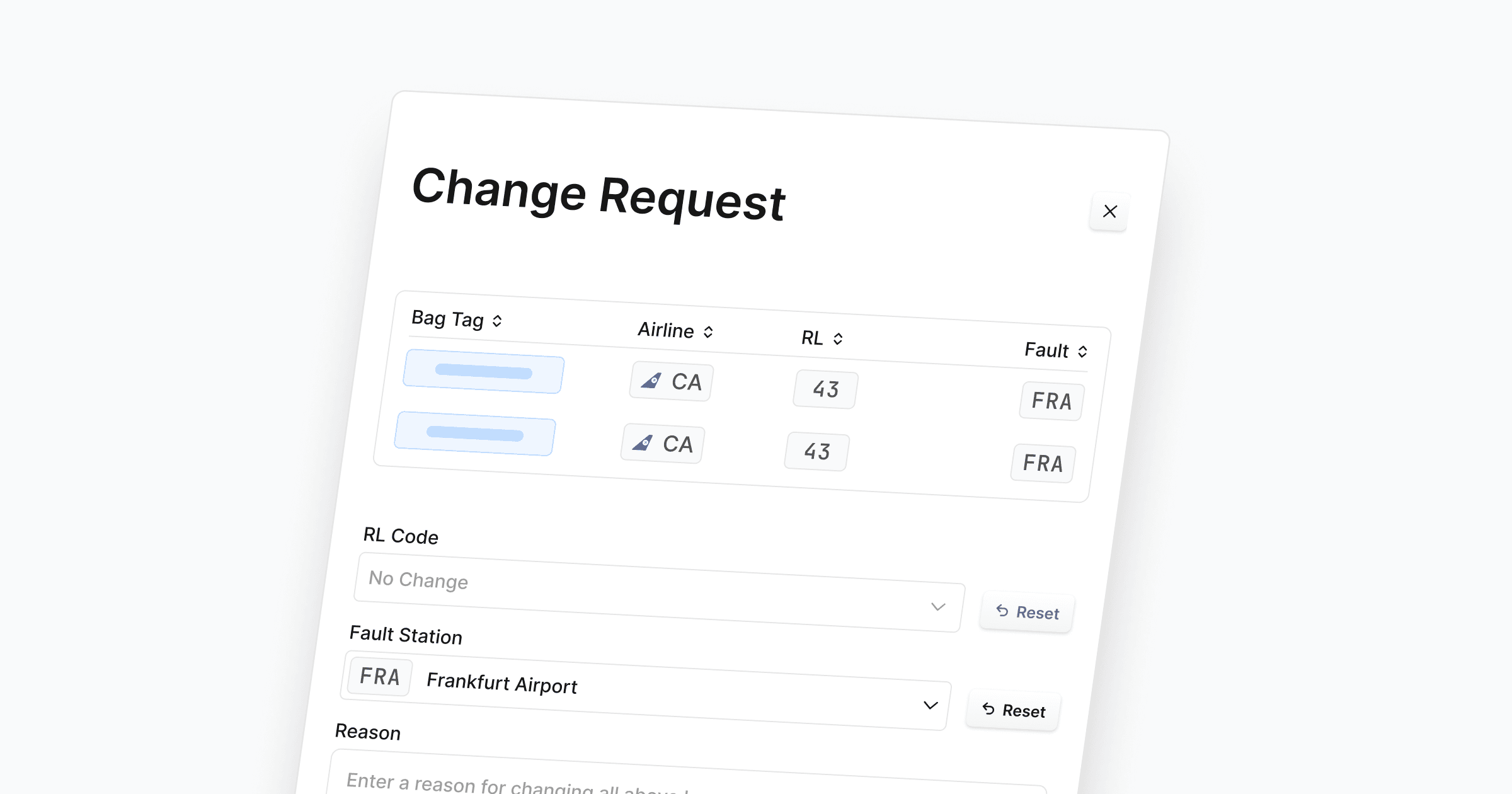
We’ve added Change Requests to Cosmos, giving teams a structured way to request and review corrections to baggage data (also know as baggage clearing). From the Baggage page, users can create a request for one or several bags, choose the requested reason for loss code or fault station, add a reason for the change, and submit it for review.
Reviewers now have a dedicated Change Requests page with a three-panel layout for working through requests. Each request shows the affected bags, requested changes, current live state, and direct links back to the related baggage cases. Reviewers can approve, reject, or cancel requests from one place.
Further Improvements
Feature: Organization admins can now manage Reason for loss (RL) and Delay code descriptions directly in Settings.
Usability: Broken links and unexpected errors now use clearer in-app recovery screens.
We’ve added Change Requests to Cosmos, giving teams a structured way to request and review corrections to baggage data (also know as baggage clearing). From the Baggage page, users can create a request for one or several bags, choose the requested reason for loss code or fault station, add a reason for the change, and submit it for review.
Reviewers now have a dedicated Change Requests page with a three-panel layout for working through requests. Each request shows the affected bags, requested changes, current live state, and direct links back to the related baggage cases. Reviewers can approve, reject, or cancel requests from one place.
Further Improvements
Feature: Organization admins can now manage Reason for loss (RL) and Delay code descriptions directly in Settings.
Usability: Broken links and unexpected errors now use clearer in-app recovery screens.
We’ve added Change Requests to Cosmos, giving teams a structured way to request and review corrections to baggage data (also know as baggage clearing). From the Baggage page, users can create a request for one or several bags, choose the requested reason for loss code or fault station, add a reason for the change, and submit it for review.
Reviewers now have a dedicated Change Requests page with a three-panel layout for working through requests. Each request shows the affected bags, requested changes, current live state, and direct links back to the related baggage cases. Reviewers can approve, reject, or cancel requests from one place.
Further Improvements
Feature: Organization admins can now manage Reason for loss (RL) and Delay code descriptions directly in Settings.
Usability: Broken links and unexpected errors now use clearer in-app recovery screens.
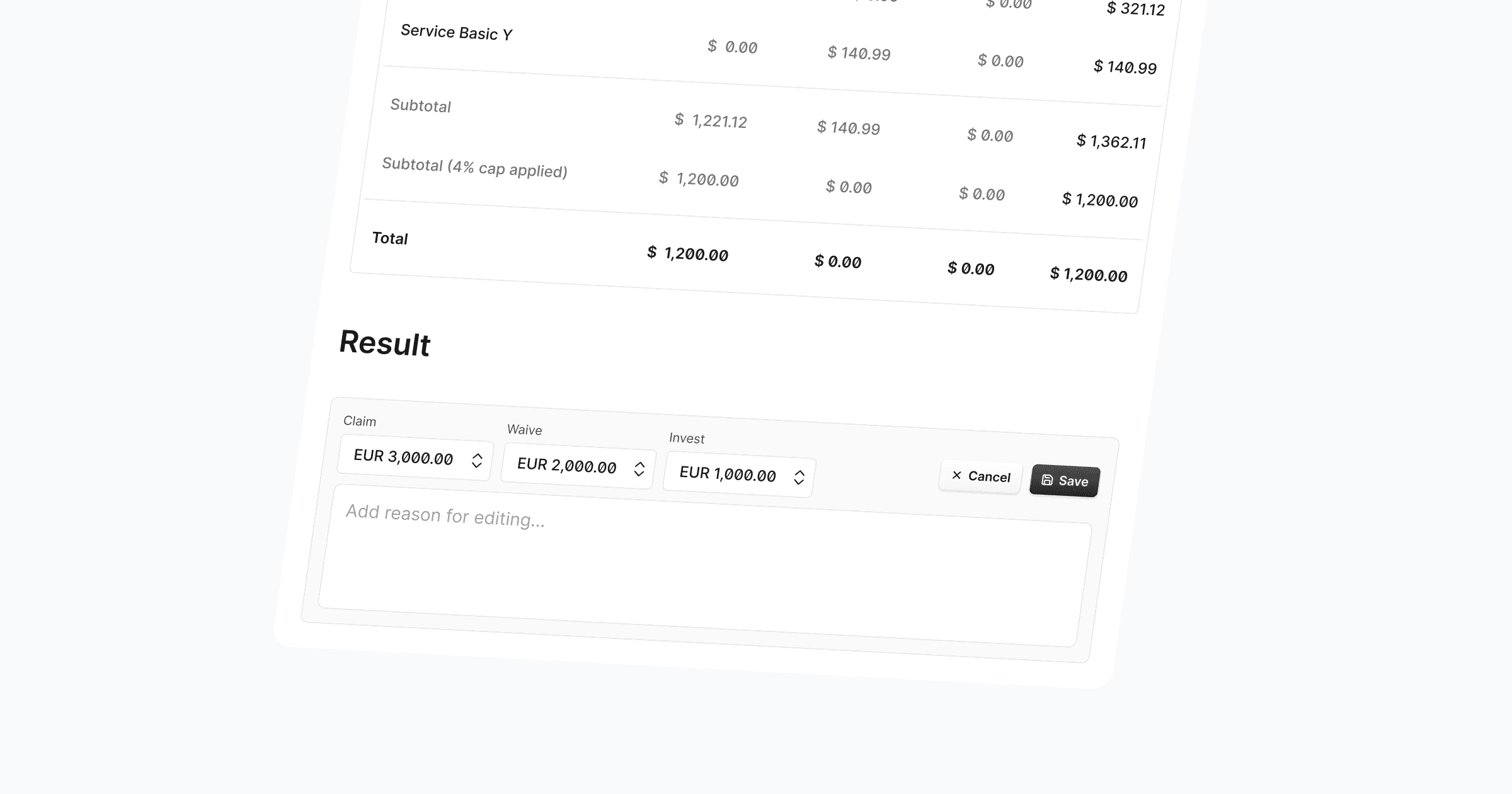
SLA Payments now support a third allocation type alongside Claim and Waive: Invest. When processing a payment, you can allocate a custom invest amount to reflect re-invested penalty budgets — visible in the payment detail view, the payments table, activity entries, and CSV exports.
Claim, Waive, and Invest can now also be edited as free-input fields without rigid validation, giving you the flexibility to handle real-world payment scenarios that don't always fit the strict reporting process.
Invest amounts are tracked in both contract and airline currency, consistent with how Claim and Waive already work.
Activity logs and notification emails now include invest details alongside claim and waive totals.
CSV exports include dedicated invest columns for both currencies.
This update gives airlines greater control over how penalty amounts are distributed — covering more use cases without workarounds.
Further Improvements
Bug fix: Airline icons uploaded as PNG failed to load in certain views. These now render correctly across the platform.
SLA Payments now support a third allocation type alongside Claim and Waive: Invest. When processing a payment, you can allocate a custom invest amount to reflect re-invested penalty budgets — visible in the payment detail view, the payments table, activity entries, and CSV exports.
Claim, Waive, and Invest can now also be edited as free-input fields without rigid validation, giving you the flexibility to handle real-world payment scenarios that don't always fit the strict reporting process.
Invest amounts are tracked in both contract and airline currency, consistent with how Claim and Waive already work.
Activity logs and notification emails now include invest details alongside claim and waive totals.
CSV exports include dedicated invest columns for both currencies.
This update gives airlines greater control over how penalty amounts are distributed — covering more use cases without workarounds.
Further Improvements
Bug fix: Airline icons uploaded as PNG failed to load in certain views. These now render correctly across the platform.
SLA Payments now support a third allocation type alongside Claim and Waive: Invest. When processing a payment, you can allocate a custom invest amount to reflect re-invested penalty budgets — visible in the payment detail view, the payments table, activity entries, and CSV exports.
Claim, Waive, and Invest can now also be edited as free-input fields without rigid validation, giving you the flexibility to handle real-world payment scenarios that don't always fit the strict reporting process.
Invest amounts are tracked in both contract and airline currency, consistent with how Claim and Waive already work.
Activity logs and notification emails now include invest details alongside claim and waive totals.
CSV exports include dedicated invest columns for both currencies.
This update gives airlines greater control over how penalty amounts are distributed — covering more use cases without workarounds.
Further Improvements
Bug fix: Airline icons uploaded as PNG failed to load in certain views. These now render correctly across the platform.
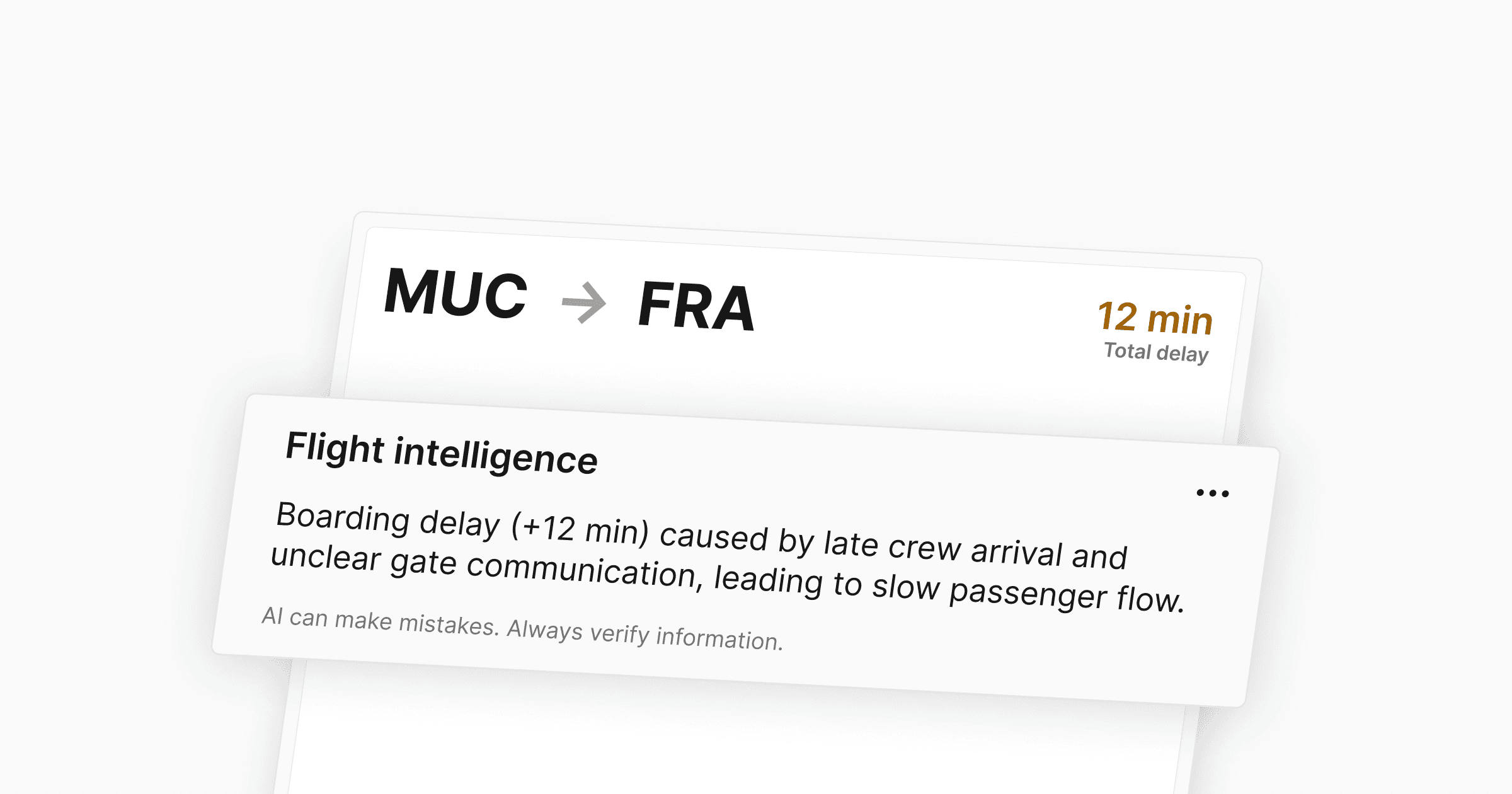
Introducing Flight Intelligence, your AI-generated operational summary of flight events. Flight Intelligence analyzes all available flight data — schedule, delay codes, incidents, turnaround feedback, and recent activities — and produces a concise summary of what happened and why.
The summary is generated automatically when you first open a flight with relevant operational data. If new information comes in, you can regenerate it via the context menu to get an updated analysis.
Station Managers can configure custom instructions per workspace under Settings → Flight Intelligence. These extend the base analysis — for example: "Always mention if delay exceeds 15 minutes" or "Flag flights with wheelchair delay but no special service requests."
The feature can be enabled or disabled per workspace via the module settings.
Flight Intelligence is a lightweight, configurable layer that surfaces operational context without replacing structured data or workflows. It gives you the power to automatically adapt and automate analytics to your individual needs – making it easier for you to spot anomalies.
Further Improvements
Usability: The Quality Checks form has been refactored for a cleaner editing experience, including correct station preselection when creating new checks.
Usability: A search field has been added to the Access Management page to find users faster across large teams.
Usability: SLA report details now show actual performance at the SLA level instead of only available values, improving clarity for report reviewers.
Introducing Flight Intelligence, your AI-generated operational summary of flight events. Flight Intelligence analyzes all available flight data — schedule, delay codes, incidents, turnaround feedback, and recent activities — and produces a concise summary of what happened and why.
The summary is generated automatically when you first open a flight with relevant operational data. If new information comes in, you can regenerate it via the context menu to get an updated analysis.
Station Managers can configure custom instructions per workspace under Settings → Flight Intelligence. These extend the base analysis — for example: "Always mention if delay exceeds 15 minutes" or "Flag flights with wheelchair delay but no special service requests."
The feature can be enabled or disabled per workspace via the module settings.
Flight Intelligence is a lightweight, configurable layer that surfaces operational context without replacing structured data or workflows. It gives you the power to automatically adapt and automate analytics to your individual needs – making it easier for you to spot anomalies.
Further Improvements
Usability: The Quality Checks form has been refactored for a cleaner editing experience, including correct station preselection when creating new checks.
Usability: A search field has been added to the Access Management page to find users faster across large teams.
Usability: SLA report details now show actual performance at the SLA level instead of only available values, improving clarity for report reviewers.
Introducing Flight Intelligence, your AI-generated operational summary of flight events. Flight Intelligence analyzes all available flight data — schedule, delay codes, incidents, turnaround feedback, and recent activities — and produces a concise summary of what happened and why.
The summary is generated automatically when you first open a flight with relevant operational data. If new information comes in, you can regenerate it via the context menu to get an updated analysis.
Station Managers can configure custom instructions per workspace under Settings → Flight Intelligence. These extend the base analysis — for example: "Always mention if delay exceeds 15 minutes" or "Flag flights with wheelchair delay but no special service requests."
The feature can be enabled or disabled per workspace via the module settings.
Flight Intelligence is a lightweight, configurable layer that surfaces operational context without replacing structured data or workflows. It gives you the power to automatically adapt and automate analytics to your individual needs – making it easier for you to spot anomalies.
Further Improvements
Usability: The Quality Checks form has been refactored for a cleaner editing experience, including correct station preselection when creating new checks.
Usability: A search field has been added to the Access Management page to find users faster across large teams.
Usability: SLA report details now show actual performance at the SLA level instead of only available values, improving clarity for report reviewers.
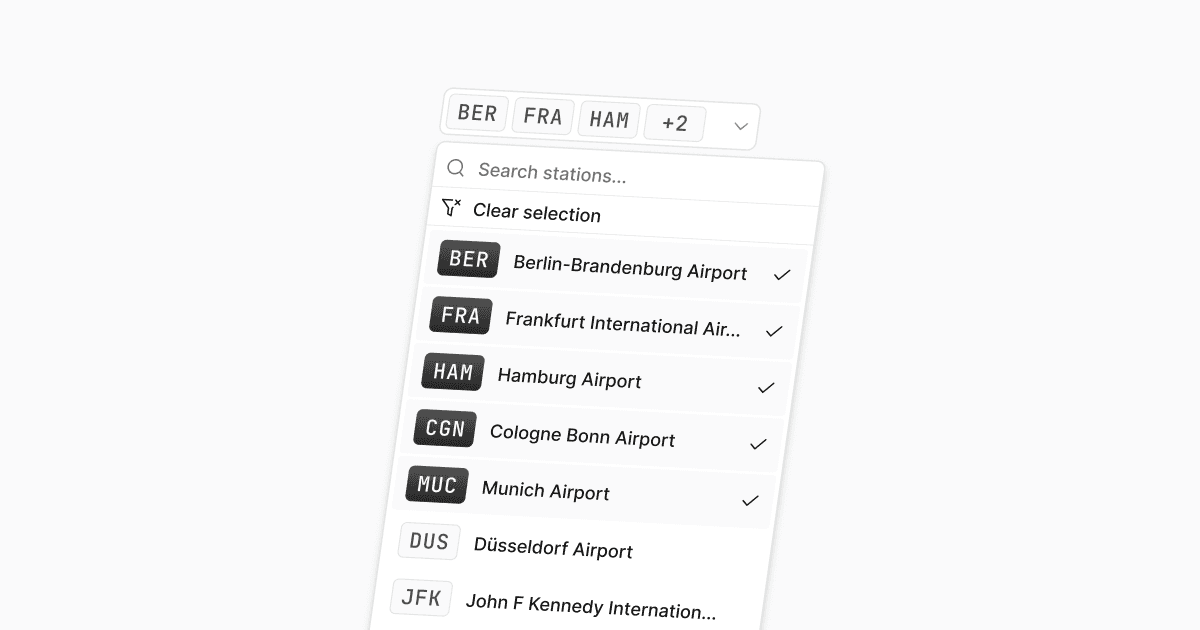
We’ve upgraded the global airport station selector to support multi-station filtering across the entire platform. The previous single-station dropdown has been replaced with a multi-select airport picker in the global header. Selected stations are displayed clearly, appear first in the list, and all options are sorted alphabetically for faster navigation.
If you have access to multiple airport stations within a workspace, you can now select several stations at once — and work across them seamlessly. If your organization only operates at one station, nothing changes, you’ll simply see a static label.
The selector resets automatically when switching workspaces, preventing stale selections.
Quality Check forms always use all available stations you have access to — independent of the current filter — ensuring accurate data entry.
This update makes multi-station operations a native capability in Cosmos — consistent, scalable, and built for complex environments.
We’ve upgraded the global airport station selector to support multi-station filtering across the entire platform. The previous single-station dropdown has been replaced with a multi-select airport picker in the global header. Selected stations are displayed clearly, appear first in the list, and all options are sorted alphabetically for faster navigation.
If you have access to multiple airport stations within a workspace, you can now select several stations at once — and work across them seamlessly. If your organization only operates at one station, nothing changes, you’ll simply see a static label.
The selector resets automatically when switching workspaces, preventing stale selections.
Quality Check forms always use all available stations you have access to — independent of the current filter — ensuring accurate data entry.
This update makes multi-station operations a native capability in Cosmos — consistent, scalable, and built for complex environments.
We’ve upgraded the global airport station selector to support multi-station filtering across the entire platform. The previous single-station dropdown has been replaced with a multi-select airport picker in the global header. Selected stations are displayed clearly, appear first in the list, and all options are sorted alphabetically for faster navigation.
If you have access to multiple airport stations within a workspace, you can now select several stations at once — and work across them seamlessly. If your organization only operates at one station, nothing changes, you’ll simply see a static label.
The selector resets automatically when switching workspaces, preventing stale selections.
Quality Check forms always use all available stations you have access to — independent of the current filter — ensuring accurate data entry.
This update makes multi-station operations a native capability in Cosmos — consistent, scalable, and built for complex environments.
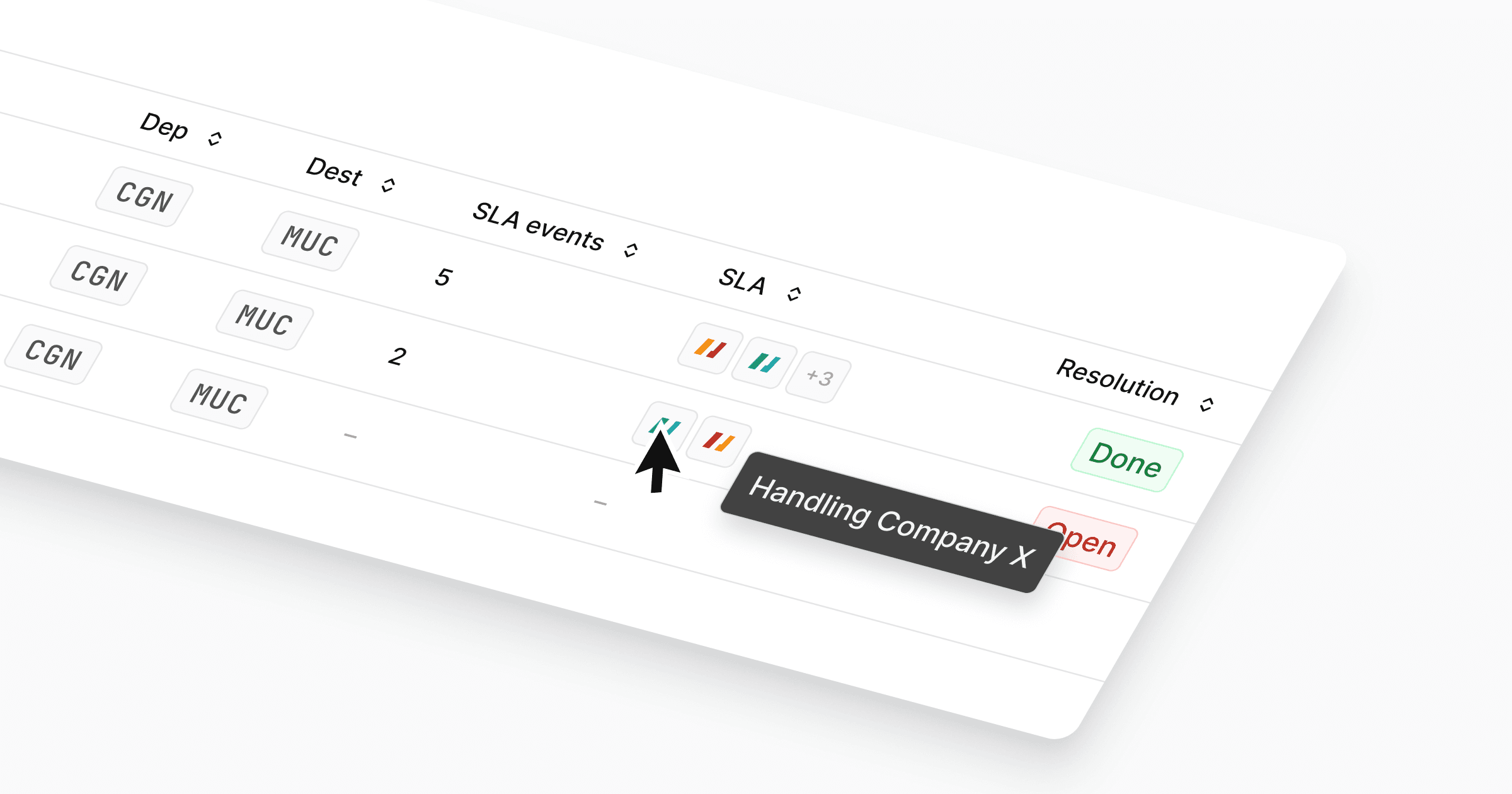
We’ve significantly improved the Flights feature based on your feedback:
Two new columns now show the number of SLA events and the responsible companies at a glance.
Access control remains strict: each handling partner only sees events relevant to them.
The separate service provider selector is gone — everything is now visible in one unified view.
We removed monthly grouping to improve performance and usability. You can now scroll and filter seamlessly across months. Additional filters and further performance improvements are already in progress.
We also completely reworked the flight details page, replacing the crowded overlay with a full-page layout that provides clarity, structure, and room for what comes next.
All SLA events are now visible on a single page, enabling faster and more confident actions.
Activities and comments have moved into a dedicated Activity section, that is always visible. Giving you an immediate overview of the latest changes and discussions.
Further Improvements
Usability: We’ve rolled out a set of under-the-hood improvements to make Cosmos feel a bit faster and more responsive, especially for users connecting from remote regions, mobile devices or less reliable networks.
We’ve significantly improved the Flights feature based on your feedback:
Two new columns now show the number of SLA events and the responsible companies at a glance.
Access control remains strict: each handling partner only sees events relevant to them.
The separate service provider selector is gone — everything is now visible in one unified view.
We removed monthly grouping to improve performance and usability. You can now scroll and filter seamlessly across months. Additional filters and further performance improvements are already in progress.
We also completely reworked the flight details page, replacing the crowded overlay with a full-page layout that provides clarity, structure, and room for what comes next.
All SLA events are now visible on a single page, enabling faster and more confident actions.
Activities and comments have moved into a dedicated Activity section, that is always visible. Giving you an immediate overview of the latest changes and discussions.
Further Improvements
Usability: We’ve rolled out a set of under-the-hood improvements to make Cosmos feel a bit faster and more responsive, especially for users connecting from remote regions, mobile devices or less reliable networks.
We’ve significantly improved the Flights feature based on your feedback:
Two new columns now show the number of SLA events and the responsible companies at a glance.
Access control remains strict: each handling partner only sees events relevant to them.
The separate service provider selector is gone — everything is now visible in one unified view.
We removed monthly grouping to improve performance and usability. You can now scroll and filter seamlessly across months. Additional filters and further performance improvements are already in progress.
We also completely reworked the flight details page, replacing the crowded overlay with a full-page layout that provides clarity, structure, and room for what comes next.
All SLA events are now visible on a single page, enabling faster and more confident actions.
Activities and comments have moved into a dedicated Activity section, that is always visible. Giving you an immediate overview of the latest changes and discussions.
Further Improvements
Usability: We’ve rolled out a set of under-the-hood improvements to make Cosmos feel a bit faster and more responsive, especially for users connecting from remote regions, mobile devices or less reliable networks.
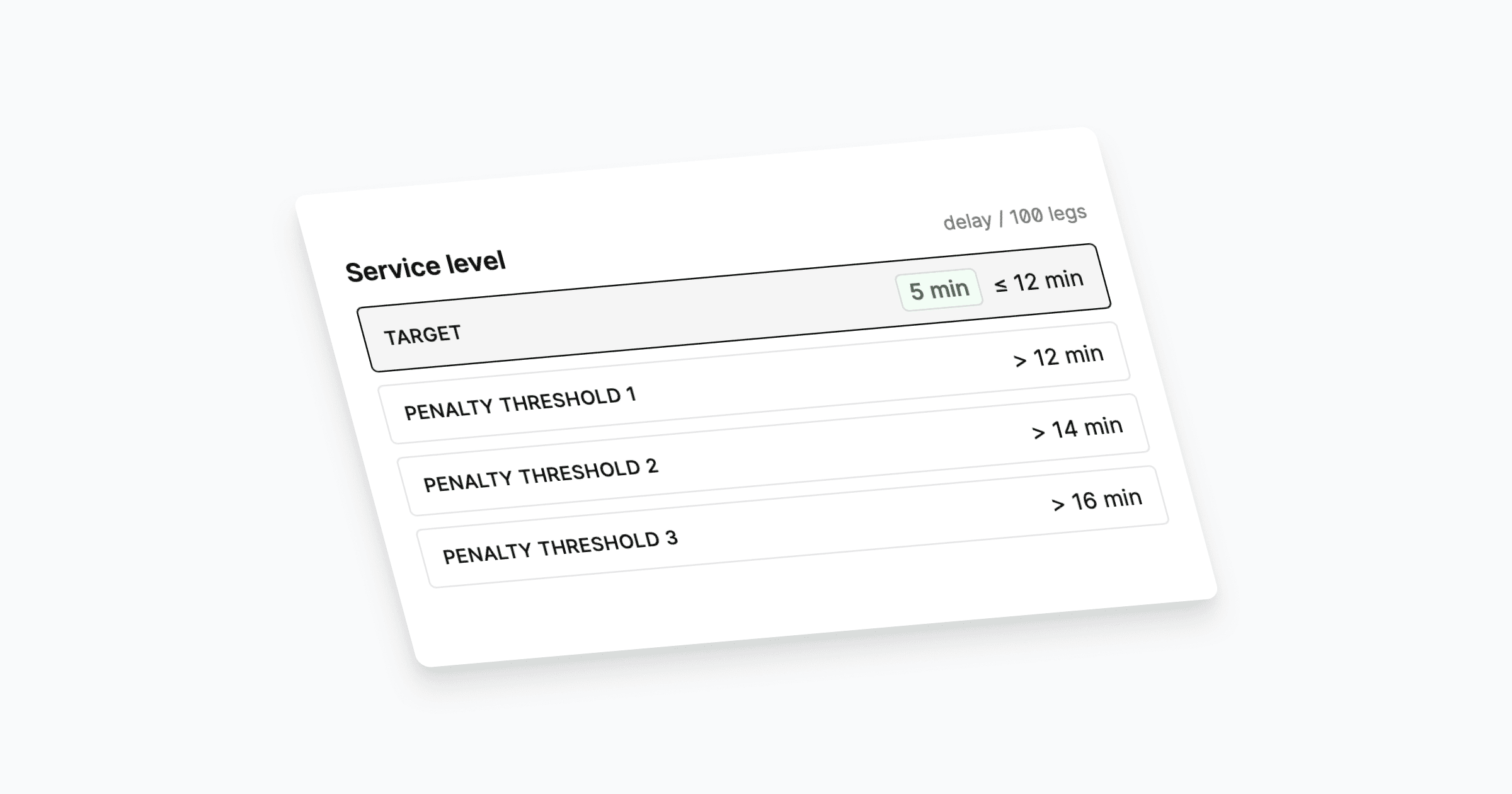
We’ve added a new feature to SLA Reports to give you better visibility into performance. Each service in the report now shows contractual servicel level(s) directly alongside the measured performance. This makes it immediately clear whether targets were met or missed, without the need to cross-check the original contract.
We’ve added a new feature to SLA Reports to give you better visibility into performance. Each service in the report now shows contractual servicel level(s) directly alongside the measured performance. This makes it immediately clear whether targets were met or missed, without the need to cross-check the original contract.
We’ve added a new feature to SLA Reports to give you better visibility into performance. Each service in the report now shows contractual servicel level(s) directly alongside the measured performance. This makes it immediately clear whether targets were met or missed, without the need to cross-check the original contract.
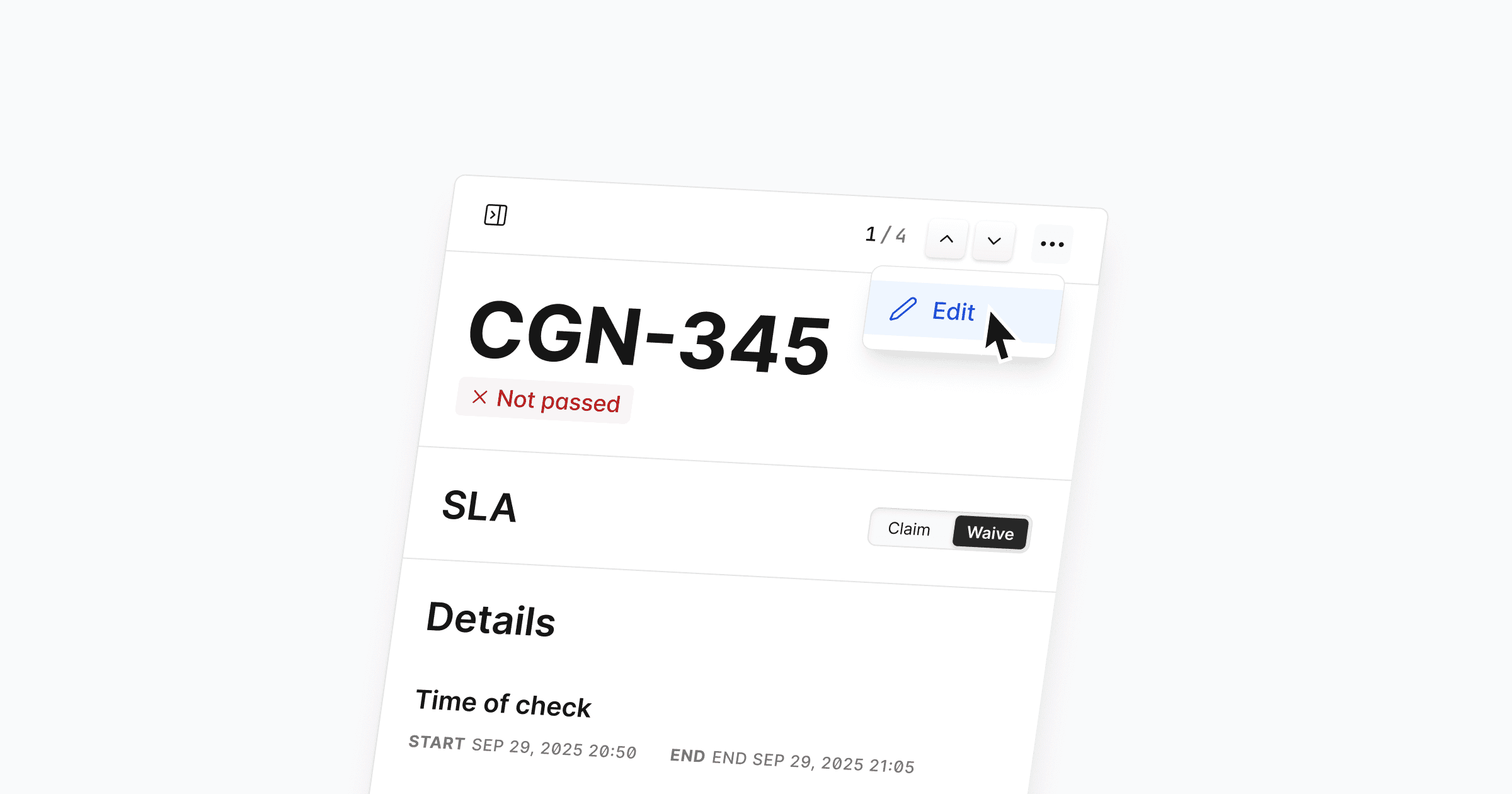
You can now edit Quality Checks, giving you more flexibility and control. This lets you correct previous mistakes, update wrong entries, and keep data accurate throughout the entire process. Editing works for all existing Quality Checks as long as they are not part of a closed report, so you can easily clean up past submissions without creating duplicates.
Simply open a Quality Check and click the three dots in the top right corner to edit.
Further Improvements
Usability: We removed the draft status and streamlined the entire workflow with a clearer structure and updated UI for a more consistent experience. Thanks for your feedback!
Usability: Claim/waive actions on Quality Checks now give clearer visual feedback when they succeed or fail, so you always know what happened.
Usability: The flow for overriding previous claim/waive actions has been improved, making it easier to understand and correct earlier decisions.
Fixes
Bug: Fixed an issue that caused an incorrect number of open Quality Checks to appear on the dashboard.
You can now edit Quality Checks, giving you more flexibility and control. This lets you correct previous mistakes, update wrong entries, and keep data accurate throughout the entire process. Editing works for all existing Quality Checks as long as they are not part of a closed report, so you can easily clean up past submissions without creating duplicates.
Simply open a Quality Check and click the three dots in the top right corner to edit.
Further Improvements
Usability: We removed the draft status and streamlined the entire workflow with a clearer structure and updated UI for a more consistent experience. Thanks for your feedback!
Usability: Claim/waive actions on Quality Checks now give clearer visual feedback when they succeed or fail, so you always know what happened.
Usability: The flow for overriding previous claim/waive actions has been improved, making it easier to understand and correct earlier decisions.
Fixes
Bug: Fixed an issue that caused an incorrect number of open Quality Checks to appear on the dashboard.
You can now edit Quality Checks, giving you more flexibility and control. This lets you correct previous mistakes, update wrong entries, and keep data accurate throughout the entire process. Editing works for all existing Quality Checks as long as they are not part of a closed report, so you can easily clean up past submissions without creating duplicates.
Simply open a Quality Check and click the three dots in the top right corner to edit.
Further Improvements
Usability: We removed the draft status and streamlined the entire workflow with a clearer structure and updated UI for a more consistent experience. Thanks for your feedback!
Usability: Claim/waive actions on Quality Checks now give clearer visual feedback when they succeed or fail, so you always know what happened.
Usability: The flow for overriding previous claim/waive actions has been improved, making it easier to understand and correct earlier decisions.
Fixes
Bug: Fixed an issue that caused an incorrect number of open Quality Checks to appear on the dashboard.

We’ve expanded flight details to show more of what matters. You now see a beautiful, realistic aircraft model, registration, and subtype by default — plus extra details like gate, position, passenger breakdown, and even special services when available.
Click any flight and select “see more” to view total passengers, load factor, and class distribution for a quick operational overview.
Further Improvements
Feature: Non‑SLA relevant RL and delay codes are now shown in a neutral color and only SLA relevant codes remain yellow. This makes it easier for you to directly spot relevant codes across Flights, Baggage and Quality Checks. Support for the Station Dashboard is planned.
Usability: We added a popup that informs you when no data is available for a station
Design: Refreshed the styling of attachments
Design: Improved design of quality check details for faster review and better readability of service basics descriptions
Fixes
Bug: Resolved issues in the quality checks creation form
We’ve expanded flight details to show more of what matters. You now see a beautiful, realistic aircraft model, registration, and subtype by default — plus extra details like gate, position, passenger breakdown, and even special services when available.
Click any flight and select “see more” to view total passengers, load factor, and class distribution for a quick operational overview.
Further Improvements
Feature: Non‑SLA relevant RL and delay codes are now shown in a neutral color and only SLA relevant codes remain yellow. This makes it easier for you to directly spot relevant codes across Flights, Baggage and Quality Checks. Support for the Station Dashboard is planned.
Usability: We added a popup that informs you when no data is available for a station
Design: Refreshed the styling of attachments
Design: Improved design of quality check details for faster review and better readability of service basics descriptions
Fixes
Bug: Resolved issues in the quality checks creation form
We’ve expanded flight details to show more of what matters. You now see a beautiful, realistic aircraft model, registration, and subtype by default — plus extra details like gate, position, passenger breakdown, and even special services when available.
Click any flight and select “see more” to view total passengers, load factor, and class distribution for a quick operational overview.
Further Improvements
Feature: Non‑SLA relevant RL and delay codes are now shown in a neutral color and only SLA relevant codes remain yellow. This makes it easier for you to directly spot relevant codes across Flights, Baggage and Quality Checks. Support for the Station Dashboard is planned.
Usability: We added a popup that informs you when no data is available for a station
Design: Refreshed the styling of attachments
Design: Improved design of quality check details for faster review and better readability of service basics descriptions
Fixes
Bug: Resolved issues in the quality checks creation form
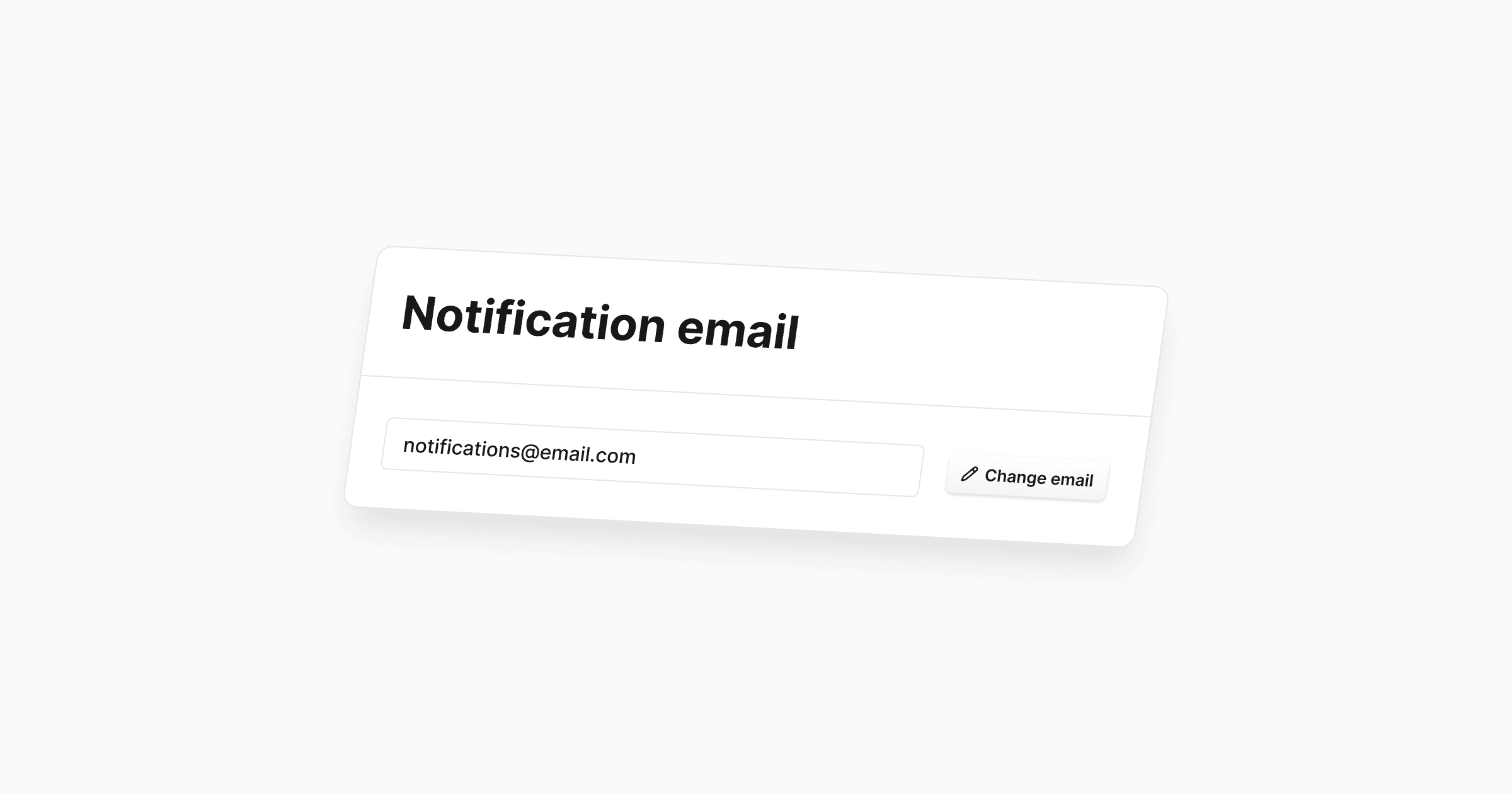
We’ve added more flexibility in how you can receive updates and notifications. You can now change your notification email anytime in the notification settings of the Cosmos app.
To protect privacy and security, any new notification email must be verified. Only verified addresses will receive notifications, keeping sensitive information from being misdelivered.
How to change your notification email in Cosmos
Go to Settings > Notifications, then click Change email.
Enter your new, valid email and click Send verification email.
Check your inbox and confirm your new notification email via the button in the verification email. You’ll be redirected to see if verification succeeded (you can always resend if needed).
We’ve added more flexibility in how you can receive updates and notifications. You can now change your notification email anytime in the notification settings of the Cosmos app.
To protect privacy and security, any new notification email must be verified. Only verified addresses will receive notifications, keeping sensitive information from being misdelivered.
How to change your notification email in Cosmos
Go to Settings > Notifications, then click Change email.
Enter your new, valid email and click Send verification email.
Check your inbox and confirm your new notification email via the button in the verification email. You’ll be redirected to see if verification succeeded (you can always resend if needed).
We’ve added more flexibility in how you can receive updates and notifications. You can now change your notification email anytime in the notification settings of the Cosmos app.
To protect privacy and security, any new notification email must be verified. Only verified addresses will receive notifications, keeping sensitive information from being misdelivered.
How to change your notification email in Cosmos
Go to Settings > Notifications, then click Change email.
Enter your new, valid email and click Send verification email.
Check your inbox and confirm your new notification email via the button in the verification email. You’ll be redirected to see if verification succeeded (you can always resend if needed).

We’ve made it easier to stay on top of what matters most. The Dashboard now shows more key information at a glance, including our new quick links for delayed flights, open flights, bag cases, and quality checks.
Click into details
Each card is interactive — simply click and you’ll get a tailored list of related events that require your attention. No more digging through multiple views.
Want to see more?
This is just the start. We’d love your feedback on what other quick links or metrics you’d like to see on the dashboard. Let us know!
We’ve made it easier to stay on top of what matters most. The Dashboard now shows more key information at a glance, including our new quick links for delayed flights, open flights, bag cases, and quality checks.
Click into details
Each card is interactive — simply click and you’ll get a tailored list of related events that require your attention. No more digging through multiple views.
Want to see more?
This is just the start. We’d love your feedback on what other quick links or metrics you’d like to see on the dashboard. Let us know!
We’ve made it easier to stay on top of what matters most. The Dashboard now shows more key information at a glance, including our new quick links for delayed flights, open flights, bag cases, and quality checks.
Click into details
Each card is interactive — simply click and you’ll get a tailored list of related events that require your attention. No more digging through multiple views.
Want to see more?
This is just the start. We’d love your feedback on what other quick links or metrics you’d like to see on the dashboard. Let us know!
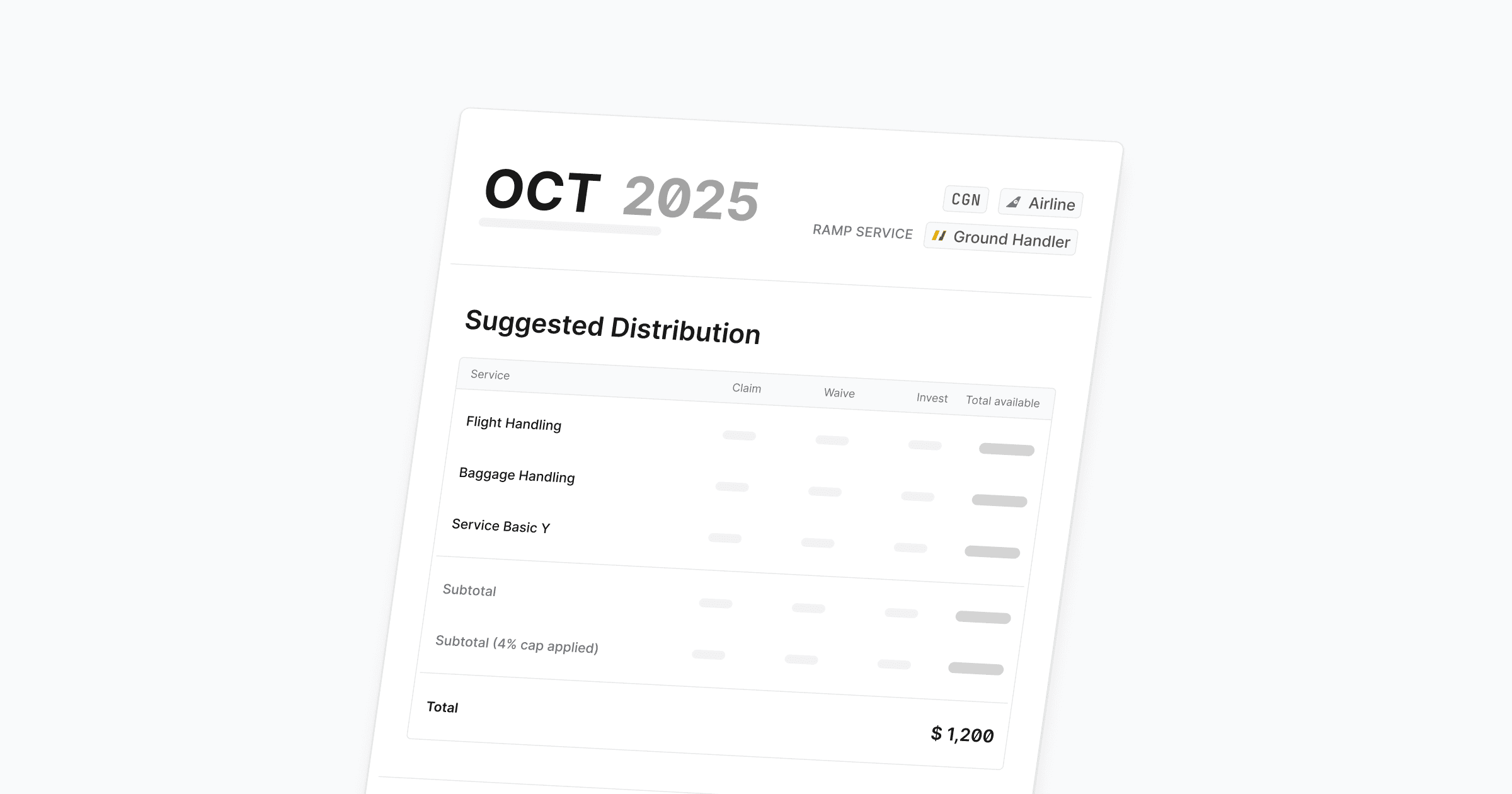
SLA Payments are now available, giving you a transparent view of how performance translates into financial outcomes.
This closes the loop: from visibility in SLA events, to aggregated reporting, to actionable financial settlement based on real performance and transparent tracking.
What’s new:
Suggested Distribution: Clear allocation of claims, waivers, and investments per service
Automatic Subtotals and Caps: The system calculates limits for you, reducing manual work
Direct Link to SLA Reports: Payments are grounded in the actual events and service-level data already captured
We’re continuously improving — let us know what else you’d like to see in SLA Payments.
SLA Payments are now available, giving you a transparent view of how performance translates into financial outcomes.
This closes the loop: from visibility in SLA events, to aggregated reporting, to actionable financial settlement based on real performance and transparent tracking.
What’s new:
Suggested Distribution: Clear allocation of claims, waivers, and investments per service
Automatic Subtotals and Caps: The system calculates limits for you, reducing manual work
Direct Link to SLA Reports: Payments are grounded in the actual events and service-level data already captured
We’re continuously improving — let us know what else you’d like to see in SLA Payments.
SLA Payments are now available, giving you a transparent view of how performance translates into financial outcomes.
This closes the loop: from visibility in SLA events, to aggregated reporting, to actionable financial settlement based on real performance and transparent tracking.
What’s new:
Suggested Distribution: Clear allocation of claims, waivers, and investments per service
Automatic Subtotals and Caps: The system calculates limits for you, reducing manual work
Direct Link to SLA Reports: Payments are grounded in the actual events and service-level data already captured
We’re continuously improving — let us know what else you’d like to see in SLA Payments.

We’ve launched the first version of monthly station-level SLA reports, giving you clear visibility into every SLA event and performance.
You can now:
Track performance by service category (e.g. flight handling, baggage, quality checks)
Get an aggregated overview of SLA events
Print the SLA event overview of a month
This is just the beginning — more automation, export options, and SLA Payments are coming soon.
We’ve launched the first version of monthly station-level SLA reports, giving you clear visibility into every SLA event and performance.
You can now:
Track performance by service category (e.g. flight handling, baggage, quality checks)
Get an aggregated overview of SLA events
Print the SLA event overview of a month
This is just the beginning — more automation, export options, and SLA Payments are coming soon.
We’ve launched the first version of monthly station-level SLA reports, giving you clear visibility into every SLA event and performance.
You can now:
Track performance by service category (e.g. flight handling, baggage, quality checks)
Get an aggregated overview of SLA events
Print the SLA event overview of a month
This is just the beginning — more automation, export options, and SLA Payments are coming soon.
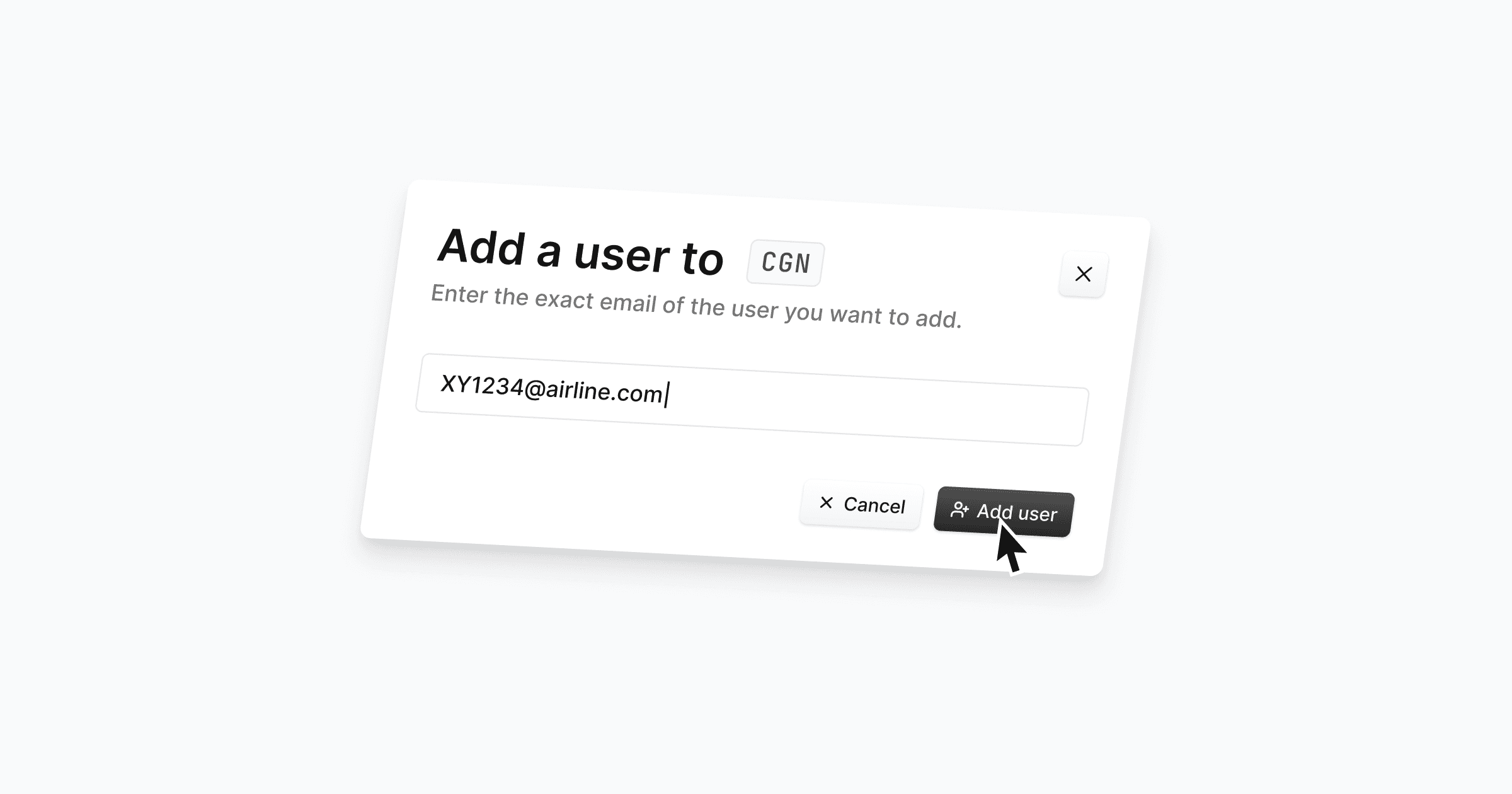
You can now manage user access at the airport level!
Add team members to specific stations (e.g. CGN, FRA) by entering their email — they’ll only see the data and tools relevant to their assigned airport.
This ensures cleaner access control, better data separation, and smoother collaboration across locations.
You can now manage user access at the airport level!
Add team members to specific stations (e.g. CGN, FRA) by entering their email — they’ll only see the data and tools relevant to their assigned airport.
This ensures cleaner access control, better data separation, and smoother collaboration across locations.
You can now manage user access at the airport level!
Add team members to specific stations (e.g. CGN, FRA) by entering their email — they’ll only see the data and tools relevant to their assigned airport.
This ensures cleaner access control, better data separation, and smoother collaboration across locations.
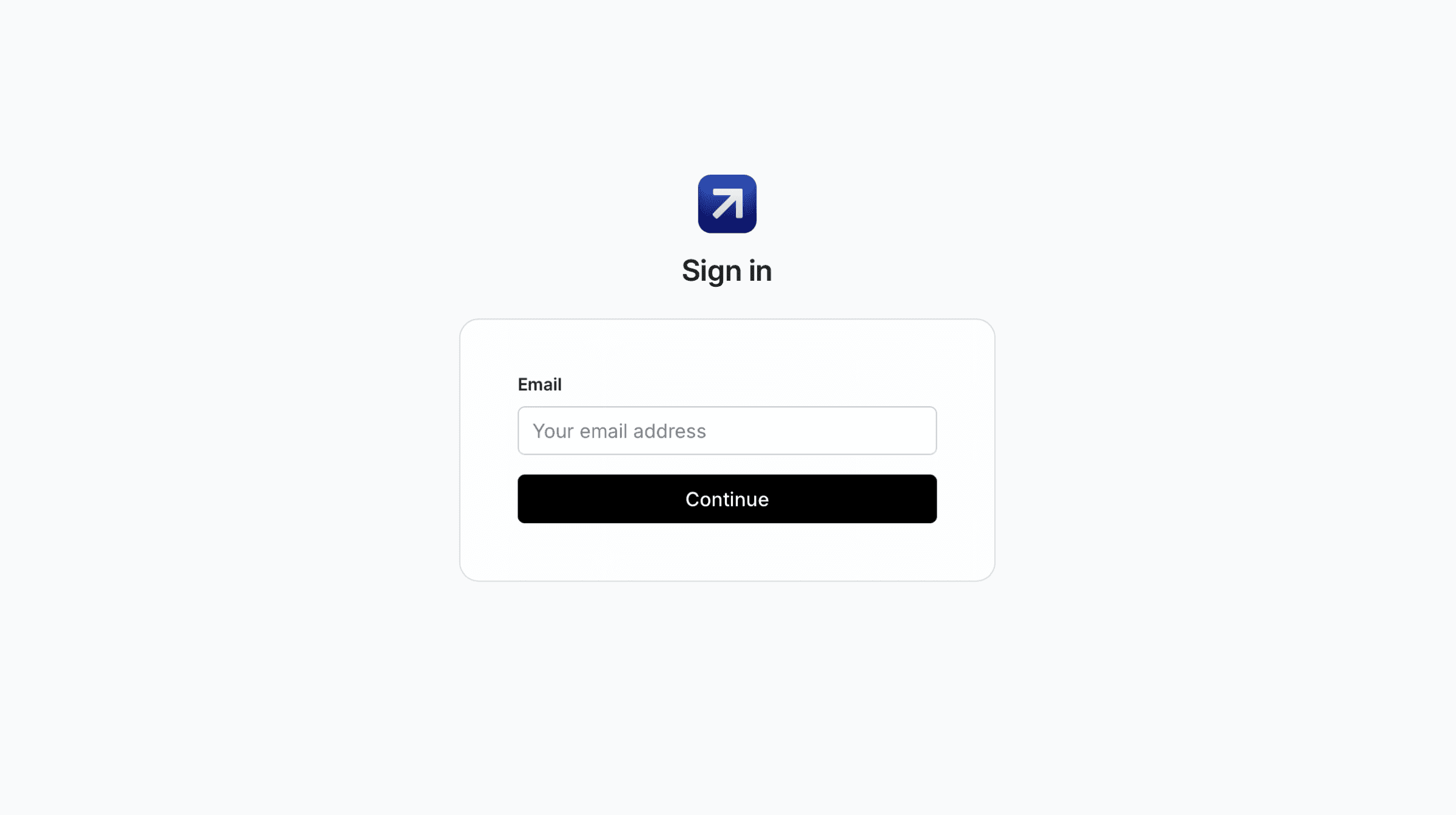
We made some improvements to the Cosmos login experience. This change allows for a more seamless and secure sign-in flow, including support for Single Sign-On (SSO). Enterprise Customers can now also request a Directory Sync to ensure seamless user provisioning.
If you have any questions, feel free to reach out to our team at support@usecosmos.com.
We made some improvements to the Cosmos login experience. This change allows for a more seamless and secure sign-in flow, including support for Single Sign-On (SSO). Enterprise Customers can now also request a Directory Sync to ensure seamless user provisioning.
If you have any questions, feel free to reach out to our team at support@usecosmos.com.
We made some improvements to the Cosmos login experience. This change allows for a more seamless and secure sign-in flow, including support for Single Sign-On (SSO). Enterprise Customers can now also request a Directory Sync to ensure seamless user provisioning.
If you have any questions, feel free to reach out to our team at support@usecosmos.com.

We’ve introduced a new sidebar to help you move faster, stay organized, and make space for what’s coming next. The new sidebar brings more structure, clarity, and focus to your daily workflow – without changing how Cosmos works.
This update also sets the stage for upcoming features that will live alongside your day-to-day tools, without getting in the way.
Want to get a preview of what's coming? Contact us or schedule a Demo today!
We’ve introduced a new sidebar to help you move faster, stay organized, and make space for what’s coming next. The new sidebar brings more structure, clarity, and focus to your daily workflow – without changing how Cosmos works.
This update also sets the stage for upcoming features that will live alongside your day-to-day tools, without getting in the way.
Want to get a preview of what's coming? Contact us or schedule a Demo today!
We’ve introduced a new sidebar to help you move faster, stay organized, and make space for what’s coming next. The new sidebar brings more structure, clarity, and focus to your daily workflow – without changing how Cosmos works.
This update also sets the stage for upcoming features that will live alongside your day-to-day tools, without getting in the way.
Want to get a preview of what's coming? Contact us or schedule a Demo today!

We are happy to finally release one of your most requested features: File Attachments! You can now attach images or pdfs of e.g. flight reports to your messages in Cosmos. Cosmos supports the following file types:
Images: .jpg, .jpeg, .png, .bmp, .webp, .heic, .heif
Documents: .pdf, .doc, .docx, .txt
Presentations: .pptx, .ppt
Tables: .csv, .xlsx, .xls
Emails: .eml, .msg
If your workflow requires a file type that isn’t listed, please contact feedback@usecosmos.com, and we’ll assess whether it can be added.
We are happy to finally release one of your most requested features: File Attachments! You can now attach images or pdfs of e.g. flight reports to your messages in Cosmos. Cosmos supports the following file types:
Images: .jpg, .jpeg, .png, .bmp, .webp, .heic, .heif
Documents: .pdf, .doc, .docx, .txt
Presentations: .pptx, .ppt
Tables: .csv, .xlsx, .xls
Emails: .eml, .msg
If your workflow requires a file type that isn’t listed, please contact feedback@usecosmos.com, and we’ll assess whether it can be added.
We are happy to finally release one of your most requested features: File Attachments! You can now attach images or pdfs of e.g. flight reports to your messages in Cosmos. Cosmos supports the following file types:
Images: .jpg, .jpeg, .png, .bmp, .webp, .heic, .heif
Documents: .pdf, .doc, .docx, .txt
Presentations: .pptx, .ppt
Tables: .csv, .xlsx, .xls
Emails: .eml, .msg
If your workflow requires a file type that isn’t listed, please contact feedback@usecosmos.com, and we’ll assess whether it can be added.

We are happy to release one of the new features we have been working on. We heard your requests and we're excited to announce that service basics can now be tracked with Quality Checks on Cosmos! You will be able to use this feature, if your station is using service basics in its contracts with service partners.
We're thrilled to finally get this out to you and we're confident it will help you in your daily work. Here's why:
You can create a new check in less than a minute and even save drafts that you can refine later.
Contractually agreed service basics are pre-filled based on your station and the selected service partner.
You can link a check to a specific flight, enabling more insights and better analytics in the long run.
Ready to dive in and give it a try? Three simple steps:
Sign in to Cosmos
Navigate to the new "Quality Checks" Tab
Click on "New Check" and fill out the Form
We are happy to release one of the new features we have been working on. We heard your requests and we're excited to announce that service basics can now be tracked with Quality Checks on Cosmos! You will be able to use this feature, if your station is using service basics in its contracts with service partners.
We're thrilled to finally get this out to you and we're confident it will help you in your daily work. Here's why:
You can create a new check in less than a minute and even save drafts that you can refine later.
Contractually agreed service basics are pre-filled based on your station and the selected service partner.
You can link a check to a specific flight, enabling more insights and better analytics in the long run.
Ready to dive in and give it a try? Three simple steps:
Sign in to Cosmos
Navigate to the new "Quality Checks" Tab
Click on "New Check" and fill out the Form
We are happy to release one of the new features we have been working on. We heard your requests and we're excited to announce that service basics can now be tracked with Quality Checks on Cosmos! You will be able to use this feature, if your station is using service basics in its contracts with service partners.
We're thrilled to finally get this out to you and we're confident it will help you in your daily work. Here's why:
You can create a new check in less than a minute and even save drafts that you can refine later.
Contractually agreed service basics are pre-filled based on your station and the selected service partner.
You can link a check to a specific flight, enabling more insights and better analytics in the long run.
Ready to dive in and give it a try? Three simple steps:
Sign in to Cosmos
Navigate to the new "Quality Checks" Tab
Click on "New Check" and fill out the Form
We are proud to announce our achievement of ISO 27001:2022 compliance 🔒
This certification underscores our commitment to the highest standards of information security, ensuring our customers' data is protected with integrity.
It enhances the trust our customers place in us as we continue to foster transparency and collaboration in the aviation industry.
We are proud to announce our achievement of ISO 27001:2022 compliance 🔒
This certification underscores our commitment to the highest standards of information security, ensuring our customers' data is protected with integrity.
It enhances the trust our customers place in us as we continue to foster transparency and collaboration in the aviation industry.
We are proud to announce our achievement of ISO 27001:2022 compliance 🔒
This certification underscores our commitment to the highest standards of information security, ensuring our customers' data is protected with integrity.
It enhances the trust our customers place in us as we continue to foster transparency and collaboration in the aviation industry.
Make every station perform like your best.
Make every station perform like your best.
Make every station perform like your best.
Make every station perform like your best
Cosmos connects airlines, airports, and ground handlers. A single platform to manage services, contracts, and SLAs.
Trust Center


©
2026
Cosmos Solutions GmbH
Make every station perform like your best
Cosmos connects airlines, airports, and ground handlers. A single platform to manage services, contracts, and SLAs.
Cosmos Solutions GmbH
2026
©
Make every station perform like your best
Cosmos connects airlines, airports, and ground handlers. A single platform to manage services, contracts, and SLAs.
Trust Center
©
2026
Cosmos Solutions GmbH